Search
Items tagged with: Filezilla
Ok so video uploads to #friendica kind of suck, I get it, it is not exactly a video platform, but I have made it my all in one social and website, so I created a complex solution to an easy problem, as I want control over where my content is hosted/served from, I made this convoluted script and process for my video uploads, it starts with opening #filezilla and ftping into my /storage/videos folder in my instance, yes I created a folder in /storage labeled videos, after I move the .mp4 into that folder I run a script that I placed in the root of my instance which is called register-video.php and here is the script,
after you have imported your video via ftp to your /storage/videos you go to your cmd that your sshed into and in the root of your instance you run
⚖️ License (MIT)
Copyright (c) 2026 pasjrwoctx👽 (Philip A. Swiderski Jr.)
Permission is hereby granted, free of charge, to any person obtaining a copy of this software and associated documentation files (the "Software"), to deal in the Software without restriction, including without limitation the rights to use, copy, modify, merge, publish, distribute, sublicense, and/or sell copies of the Software, and to permit persons to whom the Software is furnished to do so, subject to the following conditions:
The above copyright notice and this permission notice shall be included in all copies or substantial portions of the Software.
THE SOFTWARE IS PROVIDED "AS IS", WITHOUT WARRANTY OF ANY KIND, EXPRESS OR IMPLIED, INCLUDING BUT NOT LIMITED TO THE WARRANTIES OF MERCHANTABILITY, FITNESS FOR A PARTICULAR PURPOSE AND NONINFRINGEMENT. IN NO EVENT SHALL THE AUTHORS OR COPYRIGHT HOLDERS BE LIABLE FOR ANY CLAIM, DAMAGES OR OTHER LIABILITY, WHETHER IN AN ACTION OF CONTRACT, TORT OR OTHERWISE, ARISING FROM, OUT OF OR IN CONNECTION WITH THE SOFTWARE OR THE USE OR OTHER DEALINGS IN THE SOFTWARE
@Friendica Support @Friendica Developers @Friendica Admins
You can encourage my continued useless ideas, and by doing so your helping to feed, house and clothe a #disabled man living in #poverty, $5-10-15 It All Helps, via #cashapp at $woctxphotog or via #paypal at https://www.paypal.com/donate?campaign_id=5BN5MB5BVQL22
<?php

ini_set('display_errors', 1);
error_reporting(E_ALL);

// CONFIGURE THESE:
$friendica_root = '/home/someplace/public_html/your.instance.domain/';
$ftp_folder     = $friendica_root . 'storage/videos/';
$uid            = your user number;

// DATABASE CONFIG:
$db_host = 'localhost';
$db_user = 'your db user';
$db_pass = 'your db password';
$db_name = 'your db name';

// Connect to Friendica database
$mysqli = new mysqli($db_host, $db_user, $db_pass, $db_name);

if ($mysqli->connect_errno) {
    die("DB ERROR: " . $mysqli->connect_error . "\n");
}

// Debug: show folder
echo "Checking folder: $ftp_folder\n";

// Find all files in FTP folder
$files = glob($ftp_folder . '*');

if (!$files) {
    echo "No files found.\n";
    exit;
}

$allowed = array('mp4', 'webm', 'mov');

foreach ($files as $file) {

    $ext = strtolower(pathinfo($file, PATHINFO_EXTENSION));

    if (!in_array($ext, $allowed)) {
        continue;
    }

    $basename = basename($file);
    $filesize = filesize($file);
    $filetype = mime_content_type($file);

    echo "Registering: $basename\n";

    // Read file contents into memory
    $filedata = file_get_contents($file);

    if ($filedata === false) {
        echo "Failed to read file data.\n";
        continue;
    }

    // Create Friendica hash
    $hash = hash('sha256', $basename . microtime(true));

    $created = date('Y-m-d H:i:s');
    $edited  = $created;

    // Insert into Friendica attach table
    $stmt = $mysqli->prepare("
        INSERT INTO attach
        (uid, hash, filename, filetype, filesize, data, created, edited)
        VALUES (?, ?, ?, ?, ?, ?, ?, ?)
    ");

    $null = NULL;

    $stmt->bind_param(
        "isssisss",
        $uid,
        $hash,
        $basename,
        $filetype,
        $filesize,
        $filedata,
        $created,
        $edited
    );

    $stmt->send_long_data(5, $filedata);

    $stmt->execute();

    $attach_id = $stmt->insert_id;

    echo "Attachment ID: " . $attach_id . "\n";
    echo "Embed using:\n";
    echo "[video]https://your.instance.domain/attach/" . $attach_id . "[/video]\n\n";

    $stmt->close();
}

echo "Done.\n";

?>
after you have imported your video via ftp to your /storage/videos you go to your cmd that your sshed into and in the root of your instance you run
php register-video.php and you should receive php register-video.php
Checking folder: /home/someplace/public_html/your.instance.domain/storage/videos/
Registering: somerandom.mp4
Attachment ID: some number will appear here say 00
Embed using:
[video]https://your.instance.domain/attach/00[/video]
Done.⚖️ License (MIT)
Copyright (c) 2026 pasjrwoctx👽 (Philip A. Swiderski Jr.)
Permission is hereby granted, free of charge, to any person obtaining a copy of this software and associated documentation files (the "Software"), to deal in the Software without restriction, including without limitation the rights to use, copy, modify, merge, publish, distribute, sublicense, and/or sell copies of the Software, and to permit persons to whom the Software is furnished to do so, subject to the following conditions:
The above copyright notice and this permission notice shall be included in all copies or substantial portions of the Software.
THE SOFTWARE IS PROVIDED "AS IS", WITHOUT WARRANTY OF ANY KIND, EXPRESS OR IMPLIED, INCLUDING BUT NOT LIMITED TO THE WARRANTIES OF MERCHANTABILITY, FITNESS FOR A PARTICULAR PURPOSE AND NONINFRINGEMENT. IN NO EVENT SHALL THE AUTHORS OR COPYRIGHT HOLDERS BE LIABLE FOR ANY CLAIM, DAMAGES OR OTHER LIABILITY, WHETHER IN AN ACTION OF CONTRACT, TORT OR OTHERWISE, ARISING FROM, OUT OF OR IN CONNECTION WITH THE SOFTWARE OR THE USE OR OTHER DEALINGS IN THE SOFTWARE
@Friendica Support @Friendica Developers @Friendica Admins
You can encourage my continued useless ideas, and by doing so your helping to feed, house and clothe a #disabled man living in #poverty, $5-10-15 It All Helps, via #cashapp at $woctxphotog or via #paypal at https://www.paypal.com/donate?campaign_id=5BN5MB5BVQL22

There are two ways to add your keys to #FileZilla.
You can add your keys inside the "Site Manager":
Go to:
File -> Site manager ..
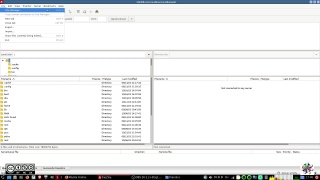
Protocol:
In the settings panel for a given site select sFTP:
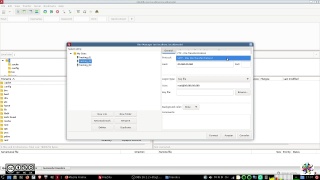
Add domain IP or domain name:
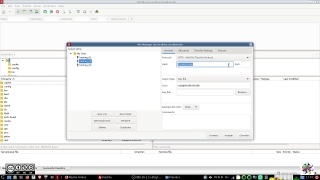
Logon Type:
Select "Key File"
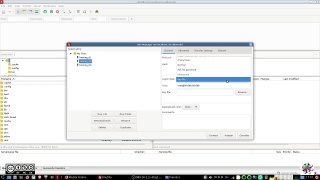
Add the user name to log onto the server:
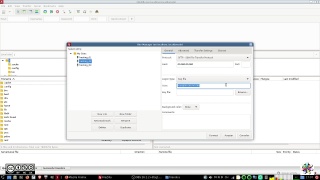
Browse for the .ppk you want to add and select it:
FileZilla offers you also to add .pem (privkey.pem) files, that's the #puTTy option for a file containing only the extracted private key of keyfile.ppk. At the same time FileZilla doesn't read/accept .pem files so it will prompt you to transform it into a .ppk file. If your .ppk is protected by a password (it should be), you get prompted to insert the password.
It is not clear if the newly created .ppk file from the .pem file by FileZilla is protected with the same password. It doesn't feel like that.
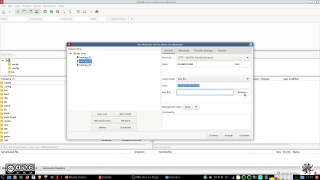
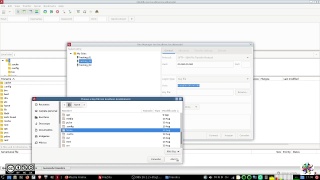
Save the changes and connect to your server.
The other option to add your key to FileZilla is by adding it directly to the main settings.
Go to:
Edit-> Settings ..
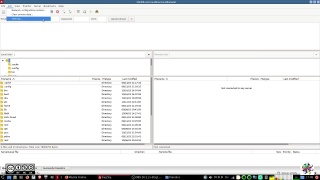
Choose SFTP and select the "Add key file" tab:
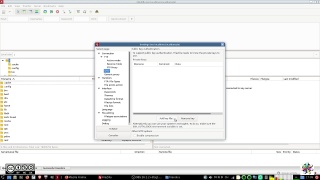
Add the key file and save.
If you use the input fields and quick connect options of the main FileZilla window, the keys saved in settings will be retrieved.
#linux #windows #howTo #fediVerse
You can add your keys inside the "Site Manager":
Go to:
File -> Site manager ..
Protocol:
In the settings panel for a given site select sFTP:
Add domain IP or domain name:
Logon Type:
Select "Key File"
Add the user name to log onto the server:
Browse for the .ppk you want to add and select it:
FileZilla offers you also to add .pem (privkey.pem) files, that's the #puTTy option for a file containing only the extracted private key of keyfile.ppk. At the same time FileZilla doesn't read/accept .pem files so it will prompt you to transform it into a .ppk file. If your .ppk is protected by a password (it should be), you get prompted to insert the password.
It is not clear if the newly created .ppk file from the .pem file by FileZilla is protected with the same password. It doesn't feel like that.
Save the changes and connect to your server.
The other option to add your key to FileZilla is by adding it directly to the main settings.
Go to:
Edit-> Settings ..
Choose SFTP and select the "Add key file" tab:
Add the key file and save.
If you use the input fields and quick connect options of the main FileZilla window, the keys saved in settings will be retrieved.
#linux #windows #howTo #fediVerse