Search
Items tagged with: friendica
I will be performing #backups, #updates and other #maintenance on the following #Friendica project services:
• files.friendi.ca
• git.friendi.ca
• ci.friendi.ca
The maintenance window is expected to last approximately two hours.
During this time, the services may go up and down several times and should not be considered reliably available.
I will post #status updates as replies to this message. Please check this thread for the current status.
Once I post the final all-clear, the services can be considered fully and reliably available again.
!Friendica Support


Friendica-Umfrage: Was wünscht ihr euch?
Ich möchte mal sammeln, was sich Friendica-Nutzer für zukünftige Funktionen wünschen.
Deshalb starte ich hier eine kleine Umfrage, die einen Monat läuft, bis zum 13. November.
Schreibt mir in die Kommentare, welche Funktion ihr euch wünscht, verbessert oder neu dazu haben möchtet.
Bitte keine allgemeinen Meinungen, ob euch Friendica gefällt oder nicht, sondern nur konkrete Funktionswünsche.
Am Ende sammle ich alles und reiche es gebündelt als Vorschlag bei den Entwicklern ein.
#Friendica #Fediverse #FediTips #Umfrage #Feedback @Friendica Support
Friendica-Umfrage: Was wünscht ihr euch?
Ich möchte mal sammeln, was sich Friendica-Nutzer für zukünftige Funktionen wünschen.
Deshalb starte ich hier eine kleine Umfrage, die einen Monat läuft, bis zum 13. November.
Schreibt mir in die Kommentare, welche Funktion ihr euch wünscht, verbessert oder neu dazu haben möchtet.
Bitte keine allgemeinen Meinungen, ob euch Friendica gefällt oder nicht, sondern nur konkrete Funktionswünsche.
Am Ende sammle ich alles und reiche es gebündelt als Vorschlag bei den Entwicklern ein.
#Friendica #Fediverse #FediTips #Umfrage #Feedback !Friendica Support
[strong]Frage | Friendica: Direkte Nachrichten an Lemmy Accounts schicken?[/strong]
Hallo Zusammen. Ich wollte fragen ob es eine Möglichkeit gibt direkte Nachrichten an einen Lemmy Account zu schicken. Das es das Lemmy intern gibt weiß ich, aber wenn ich einen solchen Account hier auf Friendica aufmache, habe ich im Gegensatz zu anderen Fediverse Accounts bei Lemmy Accounts keine Möglichkeit eine direkte Nachricht zu senden.
[strong]Danke für Eure Antworten im Voraus!
 [/strong]
#Frage #Friendica #Lemmy #DirekteNachricht #Nachricht #Federation !Friendica Support
Hallo zusammen!
Ein Freund auf GoToSocial und ich hier auf Friendica haben Probleme einander zufolgen. Genauer gesagt kann ich ihm folgen, er bekommt aber die Meldung, dass ich das bestätigen soll. Was ich nicht kann, da ich schon folge.
Hat da jemand Erfahrung mit? Gibt's da irgendeinen Trick?
#Friendica #FriendicaSupport
Out of curiosity, why can't A/V files be uploaded to Friendica? Seeing how images are handled, it seems like it should be able to do it.
#friendica
Users of small instances are familiar with the problem that posts don't initially appear on their own instance because the original account doesn't have anyone on the own instance who follows it.
What I usually do in this situation is copy the original URL of the post, paste it into the search bar on Friendica, and then — ideally — the post appears on my own instance so I can reply to it. Sometimes, though, this doesn’t work — and I’m wondering why. Specifically, I’d like to know why the post doesn’t load in the following example:
Have a look at the post at lemmy.ca/post/14531061 - it is obviously a post from the Lemmy-instance lemmy.ca. To discuss the post on the Friendica instance I'm on, I right-click on the Fediverse-symbol below the date of the post, copy the link and paste it in the #Friendica search bar. In this case, unlike others, my instance tells me that there is no result.
Why is this happening in this case while in case of e. g. lemmy.today/post/58928742 Friendica succesfully retrieves the post?
#FediHelp @Friendica Support

I'm not sure it's actually problem on #Friendica
 @Friendica Support
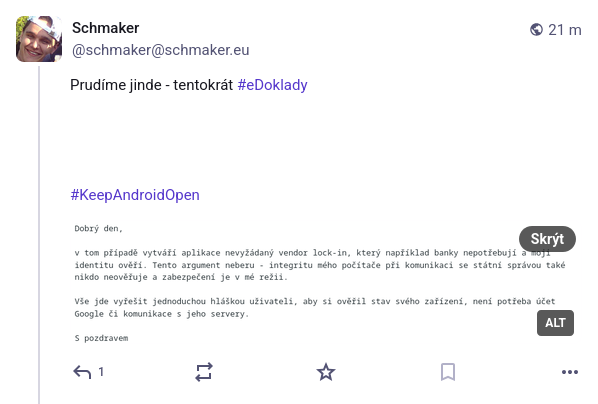
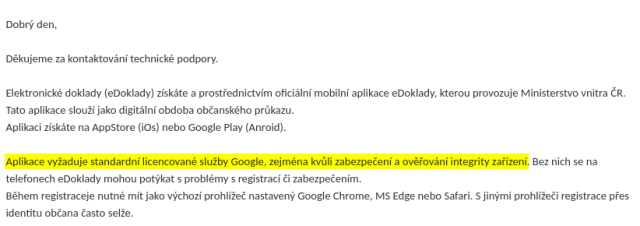
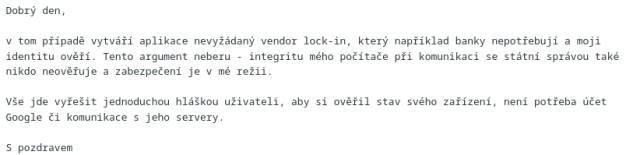
Prudíme jinde - tentokrát #eDoklady
(otevírat u mě - screenshoty jsou dva, špatně to federuje)
#KeepAndroidOpen
Does anyone know what exactly happens when changing an existing Friendica instance from [strong]"Single user instance"[/strong] to [strong]"Multi user instance"[/strong]?
Is this basically just enabling registration/additional local accounts, or are there any other behavioural changes or side effects I should be aware of?
The instance has been running as a single-user instance for quite some time, so I'm particularly interested in whether switching an existing installation is completely safe and reversible.
#Friendica #Fediverse #SelfHosting
Hi, hashtags which I previously ignored/blocked are back on my timeline. I can't find how to ignore/block them now. Any advice? Thanks. #Friendica
[strong]Friendica | Frage: Warum kann ich diesen Diaspora Kommentar nicht teilen?[/strong]
Hallo Zusammen, eben wollte ich diesen Diaspora Kommentar teilen, es geht aber nicht. Soweit ich es sehe ist der Beitrag und auch die Kommentare Öffentlich, der Mauszeiger verändert sich aber wenn ich über das Share Symbol gehe nicht entsprechend.
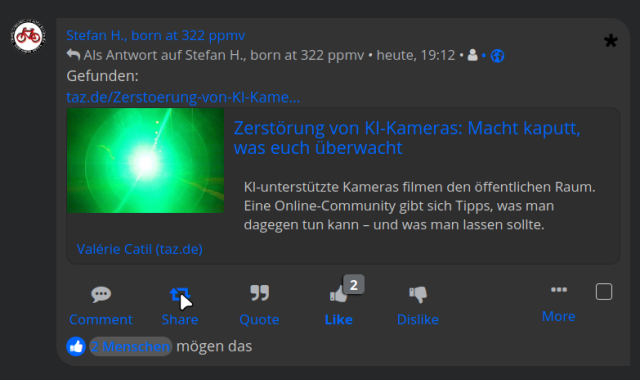
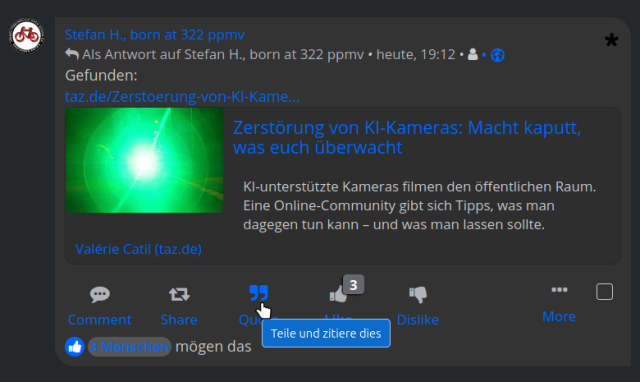
Wo könnte das Problem liegen? Danke für Eure Hilfe im Voraus!
#Friendica #Diaspora #Kommentar #Weitersagen #Share !Friendica Support
[strong]Frage | Friendica: Wie gut funktioniert das mit der Federation?[/strong]
Guten Morgen Zusammen
Ich habe mal eine Frage betreffs Federation. Und zwar habe ich gesehen das ich in Sachen Beiträge vor allen via Lemmy Feedback bekomme, aber in den allermeisten Fällen kaum aus dem Rest des Fediverse. Dabei ist mir klar das ich wenn ich in eine Lemmy Community poste, ich recht viele Leute erreiche. Aber das erklärt eben nicht warum aus dem Rest des Fediverse wo ich sehr viel mehr Kontakte habe die mir folgen so wenig zurück bekomme.Ist Euch ähnliches aufgefallen?
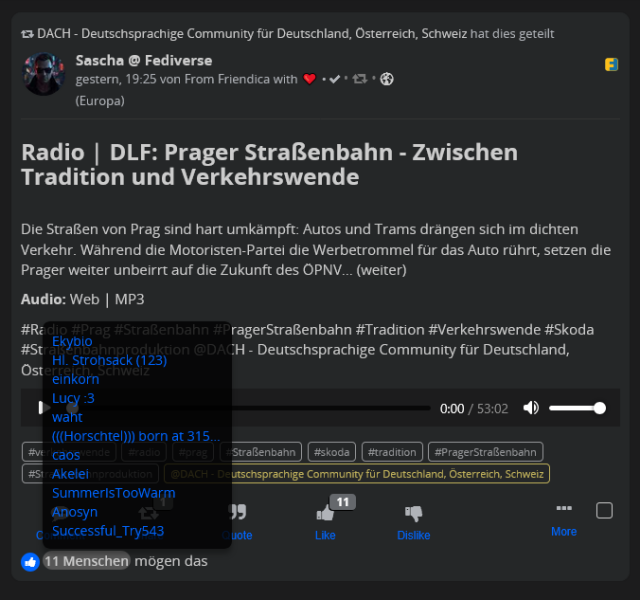
#Frage #Friendica #Federation #Feedback #Fediverse #Lemmy !Friendica Support
https://greasyfork.org/de/scripts/590396-friendica-kommentare-ab-zweiter-ebene-einklappen
Am Montag fand wieder unser monatliches [strong]Friendica-Admin-Treffen[/strong] statt. Erfreulicherweise waren zahlreiche Administratoren und auch mehrere Entwickler dabei – genau so wünschen wir uns den gemeinsamen Austausch. 😊
Ein Thema war der Umgang mit [strong]Meldungen (Reports)[/strong] im Administrationsbereich. Wir haben besprochen, wie Administratoren und Moderatoren mit gemeldeten Inhalten umgehen können, welche Schwierigkeiten es derzeit gibt und welche Verbesserungen wünschenswert wären. Die Entwickler haben die Anregungen aufgenommen und möchten sich die Vorschläge genauer ansehen.
Außerdem ging es um die [strong]Änderungen beim Start von Daemon und Worker[/strong]. Für Administratoren hat sich der Aufruf über die Kommandozeile etwas ändern. Die neue Methode kann bereits genutzt werden und sollte rechtzeitig eingerichtet werden.
Ebenfalls vorgestellt wurde die neue Technik für [strong]schnellere Seitenaktualisierungen[/strong]. Statt künftig bei jeder Aktion die komplette Seite neu zu laden, werden nur noch die geänderten Bereiche aktualisiert. Dieses Prinzip nennt sich [strong]SPA (Single Page Application)[/strong]. Dadurch wirkt Friendica deutlich flüssiger und reaktionsschneller. Die Funktion befindet sich derzeit noch in der Entwicklerversion und könnte bereits mit einer der nächsten stabilen Friendica-Versionen verfügbar werden.
Kurz gesprochen wurde auch über das [strong]Übersetzer-Addon[/strong]. Oldkid stellte den aktuellen Stand seiner Arbeiten vor und gab einen Einblick in die Funktionsweise des Addons.
Wie immer blieb genügend Zeit für Fragen, Ideen und den direkten Austausch. Genau das macht diese Treffen so wertvoll: Entwickler und Administratoren kommen miteinander ins Gespräch, diskutieren ausführlich über aktuelle Themen und entwickeln gemeinsam neue Ideen.
💬 [strong]Für den Austausch zwischen den Treffen gibt es außerdem eine XMPP-Gruppe für Friendica-Administratoren und Entwickler[/strong], die von tuxi bereitgestellt wird. Wer daran teilnehmen möchte, kann sich für eine Einladung einfach bei @Tuxi ⁂ , @OldKid ⁂ oder @Jools melden.
Vielen Dank an alle Teilnehmenden für den offenen und informativen Abend!
📅 [strong]Das nächste Friendica-Admin-Treffen findet am Montag, 24.08.2026, um 19:30 Uhr statt.[/strong] Interessierte Administratoren und Entwickler sind herzlich willkommen.
#Friendica #Fediverse #OpenSource #Community #Systemadministration @Friendica Admins
Multiple Image Layouts
I'm working on fixing/changing the way #Friendica handles multiple images in a post for the next release. Yes, I'm using AI-slop images for testing purposes on my development server. My apologies to those who don't want to see that garbage.
Masonry Layout
When the backend PHP can get dimensions from the images it uses "masonry" layout. Which work well with even numbers of images but with odd counts of images it currently leaves the last one sort of dangling there by itself:

But I think most people would assume it should display like this:

Yes? No? It's a super easy fix if this is what people want.
I'm not yet sure under what circumstances the PHP cannot get image dimensions, but if that's the case then it doesn't use "masonry" layout, it switches to the "grid" template.
PHP Grid Layout (current)

The PHP tries to figure out how many images to show in each column. These are hard-coded HTML column containers.
Pure CSS Grid Layout

Of course CSS can nicely do columns itself now so there's really no reason to have PHP doing it on the backend. Obviously PHP and CSS don't agree on which images should go in which columns, but this is super easy to implement.
Literal Grid Layout

Though when someone says "grid" isn't this more what you are expecting? It doesn't get much more griddy than squares, right? This one uses a combo of PHP and CSS to display the images in a post in your feed similarly to how the thumbnails look in your photo albums.
You may have also noticed the "ALT" in the corners. That is there in the current version of Friendica, but it's just an indicator that an image has alt text, it's not a button like on Mastodon to actually show you the alt text. Well, that's how I ended up looking at these layouts, because I'm also implementing functional alt-text buttons for Friendica. Which means updating all these image layout templates.
Not sure if it will get sorted out for this upcoming release or not, but I'm also working on how to show you the "masonry" and "grid" layouts in the post/edit/comment previews too. THAT is quite a bit trickier because the previews do not use the actual image templates.
I'm interested in any feedback both devs and users want to give me on this. There is also a thread over on the Friendica GitHub if you'd rather comment there.
@Friendica Support @Friendica Developers
Pending posts for days...⏳
Hello everyone!
I'm relatively new user here on Friendica/Fediverse. I use friendica.world as my node for now...But I noticed some strange things while posting.
Sometimes my post is showing: Delivery to remote servers is pending 0/1
Other times is showing: Delivery to remote servers is underway 1/2
I'm not sure if my posts are available to other users for Friendica and also for the Fediverse...These messages on the posts are there for days ... never going away.
I don't know if the problem is with my profile or something...or it's common issue on the server side...
What do you know about this? I would love to know. (And should I try to use a different node/server instead of friendica.world , or just to wait ?
#friendica #support #friendicaTips
#diaspora #friendica #kommentare #chronologisch #thema
Werden denn angepinnte Posts aus Friendica bei Mastodon gar nicht als "angeheftete" Beiträge oben im Profil dargestellt? Geht hier wieder mal eine der beiden Software eigene Wege, die nicht dem Standard folgen?
Ich habe schon einen voreingenommenen Verdacht, welche der beiden Plattformen das ist

!Friendica Support
- "ignorieren" und
- "entfernen"
Wann ist was angebracht? Was bedeutet es jeweils?
!Friendica Support
<?php

ini_set('display_errors', 1);
error_reporting(E_ALL);

// CONFIGURE THESE:
$friendica_root = '/home/someplace/public_html/your.instance.domain/';
$ftp_folder     = $friendica_root . 'storage/videos/';
$uid            = your user number;

// DATABASE CONFIG:
$db_host = 'localhost';
$db_user = 'your db user';
$db_pass = 'your db password';
$db_name = 'your db name';

// Connect to Friendica database
$mysqli = new mysqli($db_host, $db_user, $db_pass, $db_name);

if ($mysqli->connect_errno) {
    die("DB ERROR: " . $mysqli->connect_error . "\n");
}

// Debug: show folder
echo "Checking folder: $ftp_folder\n";

// Find all files in FTP folder
$files = glob($ftp_folder . '*');

if (!$files) {
    echo "No files found.\n";
    exit;
}

$allowed = array('mp4', 'webm', 'mov');

foreach ($files as $file) {

    $ext = strtolower(pathinfo($file, PATHINFO_EXTENSION));

    if (!in_array($ext, $allowed)) {
        continue;
    }

    $basename = basename($file);
    $filesize = filesize($file);
    $filetype = mime_content_type($file);

    echo "Registering: $basename\n";

    // Read file contents into memory
    $filedata = file_get_contents($file);

    if ($filedata === false) {
        echo "Failed to read file data.\n";
        continue;
    }

    // Create Friendica hash
    $hash = hash('sha256', $basename . microtime(true));

    $created = date('Y-m-d H:i:s');
    $edited  = $created;

    // Insert into Friendica attach table
    $stmt = $mysqli->prepare("
        INSERT INTO attach
        (uid, hash, filename, filetype, filesize, data, created, edited)
        VALUES (?, ?, ?, ?, ?, ?, ?, ?)
    ");

    $null = NULL;

    $stmt->bind_param(
        "isssisss",
        $uid,
        $hash,
        $basename,
        $filetype,
        $filesize,
        $filedata,
        $created,
        $edited
    );

    $stmt->send_long_data(5, $filedata);

    $stmt->execute();

    $attach_id = $stmt->insert_id;

    echo "Attachment ID: " . $attach_id . "\n";
    echo "Embed using:\n";
    echo "[video]https://your.instance.domain/attach/" . $attach_id . "[/video]\n\n";

    $stmt->close();
}

echo "Done.\n";

?>
after you have imported your video via ftp to your /storage/videos you go to your cmd that your sshed into and in the root of your instance you run
php register-video.php and you should receive php register-video.php
Checking folder: /home/someplace/public_html/your.instance.domain/storage/videos/
Registering: somerandom.mp4
Attachment ID: some number will appear here say 00
Embed using:
[video]https://your.instance.domain/attach/00[/video]
Done.⚖️ License (MIT)
Copyright (c) 2026 pasjrwoctx👽 (Philip A. Swiderski Jr.)
Permission is hereby granted, free of charge, to any person obtaining a copy of this software and associated documentation files (the "Software"), to deal in the Software without restriction, including without limitation the rights to use, copy, modify, merge, publish, distribute, sublicense, and/or sell copies of the Software, and to permit persons to whom the Software is furnished to do so, subject to the following conditions:
The above copyright notice and this permission notice shall be included in all copies or substantial portions of the Software.
THE SOFTWARE IS PROVIDED "AS IS", WITHOUT WARRANTY OF ANY KIND, EXPRESS OR IMPLIED, INCLUDING BUT NOT LIMITED TO THE WARRANTIES OF MERCHANTABILITY, FITNESS FOR A PARTICULAR PURPOSE AND NONINFRINGEMENT. IN NO EVENT SHALL THE AUTHORS OR COPYRIGHT HOLDERS BE LIABLE FOR ANY CLAIM, DAMAGES OR OTHER LIABILITY, WHETHER IN AN ACTION OF CONTRACT, TORT OR OTHERWISE, ARISING FROM, OUT OF OR IN CONNECTION WITH THE SOFTWARE OR THE USE OR OTHER DEALINGS IN THE SOFTWARE
@Friendica Support @Friendica Developers @Friendica Admins
You can encourage my continued useless ideas, and by doing so your helping to feed, house and clothe a #disabled man living in #poverty, $5-10-15 It All Helps, via #cashapp at $woctxphotog or via #paypal at https://www.paypal.com/donate?campaign_id=5BN5MB5BVQL22
<?php

ini_set('display_errors', 1);
error_reporting(E_ALL);

// CONFIGURE THESE:
$friendica_root = '/home/someplace/public_html/your.instance.domain/';
$ftp_folder     = $friendica_root . 'storage/videos/';
$uid            = your user number;

// DATABASE CONFIG:
$db_host = 'localhost';
$db_user = 'your db user';
$db_pass = 'your db password';
$db_name = 'your db name';

// Connect to Friendica database
$mysqli = new mysqli($db_host, $db_user, $db_pass, $db_name);

if ($mysqli->connect_errno) {
    die("DB ERROR: " . $mysqli->connect_error . "\n");
}

// Debug: show folder
echo "Checking folder: $ftp_folder\n";

// Find all files in FTP folder
$files = glob($ftp_folder . '*');

if (!$files) {
    echo "No files found.\n";
    exit;
}

$allowed = array('mp4', 'webm', 'mov');

foreach ($files as $file) {

    $ext = strtolower(pathinfo($file, PATHINFO_EXTENSION));

    if (!in_array($ext, $allowed)) {
        continue;
    }

    $basename = basename($file);
    $filesize = filesize($file);
    $filetype = mime_content_type($file);

    echo "Registering: $basename\n";

    // Read file contents into memory
    $filedata = file_get_contents($file);

    if ($filedata === false) {
        echo "Failed to read file data.\n";
        continue;
    }

    // Create Friendica hash
    $hash = hash('sha256', $basename . microtime(true));

    $created = date('Y-m-d H:i:s');
    $edited  = $created;

    // Insert into Friendica attach table
    $stmt = $mysqli->prepare("
        INSERT INTO attach
        (uid, hash, filename, filetype, filesize, data, created, edited)
        VALUES (?, ?, ?, ?, ?, ?, ?, ?)
    ");

    $null = NULL;

    $stmt->bind_param(
        "isssisss",
        $uid,
        $hash,
        $basename,
        $filetype,
        $filesize,
        $filedata,
        $created,
        $edited
    );

    $stmt->send_long_data(5, $filedata);

    $stmt->execute();

    $attach_id = $stmt->insert_id;

    echo "Attachment ID: " . $attach_id . "\n";
    echo "Embed using:\n";
    echo "[video]https://your.instance.domain/attach/" . $attach_id . "[/video]\n\n";

    $stmt->close();
}

echo "Done.\n";

?>
after you have imported your video via ftp to your /storage/videos you go to your cmd that your sshed into and in the root of your instance you run
php register-video.php and you should receive php register-video.php
Checking folder: /home/someplace/public_html/your.instance.domain/storage/videos/
Registering: somerandom.mp4
Attachment ID: some number will appear here say 00
Embed using:
[video]https://your.instance.domain/attach/00[/video]
Done.⚖️ License (MIT)
Copyright (c) 2026 pasjrwoctx👽 (Philip A. Swiderski Jr.)
Permission is hereby granted, free of charge, to any person obtaining a copy of this software and associated documentation files (the "Software"), to deal in the Software without restriction, including without limitation the rights to use, copy, modify, merge, publish, distribute, sublicense, and/or sell copies of the Software, and to permit persons to whom the Software is furnished to do so, subject to the following conditions:
The above copyright notice and this permission notice shall be included in all copies or substantial portions of the Software.
THE SOFTWARE IS PROVIDED "AS IS", WITHOUT WARRANTY OF ANY KIND, EXPRESS OR IMPLIED, INCLUDING BUT NOT LIMITED TO THE WARRANTIES OF MERCHANTABILITY, FITNESS FOR A PARTICULAR PURPOSE AND NONINFRINGEMENT. IN NO EVENT SHALL THE AUTHORS OR COPYRIGHT HOLDERS BE LIABLE FOR ANY CLAIM, DAMAGES OR OTHER LIABILITY, WHETHER IN AN ACTION OF CONTRACT, TORT OR OTHERWISE, ARISING FROM, OUT OF OR IN CONNECTION WITH THE SOFTWARE OR THE USE OR OTHER DEALINGS IN THE SOFTWARE
@Friendica Support @Friendica Developers @Friendica Admins
You can encourage my continued useless ideas, and by doing so your helping to feed, house and clothe a #disabled man living in #poverty, $5-10-15 It All Helps, via #cashapp at $woctxphotog or via #paypal at https://www.paypal.com/donate?campaign_id=5BN5MB5BVQL22

Statt FAQ zu lesen oder sich Videos anzusehen, könnte man einfach ins Gespräch kommen.
Der Termin richtet sich an alle Menschen, die von LinkedIn, Facebook, 𝕏 oder einer anderen unfreien Plattform weg wollen. Die sich für Friendica interessieren, beim Start noch etwas Hilfe benötigen oder konkrete Fragen zur Anwendung haben.
Der Rahmen:
- Jeden Samstag 14 Uhr
- 45 Minuten Plausch
- Deine Fragen zur Anwendung
- Realisiert über meet.jit.si/FriendicaPlausch
- ohne Cam aber mit Mikrofon
#Friendica #Fediverse #DIDit #DUTgemacht #DIDAY
!Friendica Support
@Steffen 🦉🇪🇺
Hallo, ich mal wieder.
Beim hochladen einer docx Datei kam immer wieder die Meldung Upload Failed ca. 4x
Eine ODT Datei (Libre Office) wurde mir gar nicht angezeigt um sie hochzuladen, was mich etwas wundert.
Dann habe ich die docx Datei in eine PDF Datei umgewandelt, dann ging das hochladen.
Was da stört ist das das kleine Blattsymbol zwischen den Hashtags steht. Ich vermute mal man kann auch einen Text anbringen zur besseren Erkennung.
Das wars, Dankeschön
Tschau
Friedhelm
#Friendica #Uploadfailed #ODT #docx #PDF
Hi!
I recently tried to install the #Bluesky addon (and it worked fine) but when I disabled it, the following/followers are still listed in my contacts page on Friendica. How can I make the people from Bluesky disappear from my #Friendica contact list? The people I follow and those that follow me.
(I don't even understand if Bluesky followers get content from me, since the addon is disabled but they are still listed as followers)
First at the very top of your index.php in the root of your friendica directory right after the <? I added the following code,
// --- ALIEN GATE START ---
$request = $_SERVER['REQUEST_URI'] ?? '';

// 0. Signed cookie (prevents bots forging it)
$secret_key = 'Your_Alien_Secret';
$valid_cookie = hash_hmac('sha256', 'verified', $secret_key);
$has_cookie = isset($_COOKIE['instance_access']) &&
              hash_equals($valid_cookie, $_COOKIE['instance_access']);

if (!$has_cookie) {

    // 1. Federation / machine endpoints (never gate)
    $is_fediverse =
        str_contains($request, '/.well-known/') ||
        str_contains($request, '/activitypub/') ||
        str_contains($request, '/api/') ||
        str_contains($request, '/assets/');

    // 2. Static assets (never gate)
    $is_static = preg_match('/\.(css|js|png|jpg|ico|svg|woff2)$/i', $request);

    // 3. Only gate the root URL
    if ($request === '/' && !$is_fediverse && !$is_static) {
        require 'gate.php';
        exit;
    }

    // 4. Prevent bypass via /index.php
    if ($request === '/index.php') {
        header('Location: /');
        exit;
    }
}
// --- ALIEN GATE END ---
then I created in the root directory again, gate.php
 <?php
// 1. VERIFICATION LOGIC
if (isset($_GET['nonce']) && isset($_GET['seed'])) {
    $nonce = (int)$_GET['nonce'];
    $seed = $_GET['seed'];
    $check_hash = hash('sha256', $seed . $nonce);

    // Verify hash matches the "000" requirement
    if (str_starts_with($check_hash, '000')) {
        $secret = 'Your_Alien_Secret';
$token  = hash_hmac('sha256', 'verified', $secret);
setcookie("instance_access", $token, time() + 86400 * 30, "/");
        header("Location: /index.php");
        exit;
    }
}

// 2. CHALLENGE UI
$seed = bin2hex(random_bytes(16));
?>
<html>
<head>
    <title>Access Verification</title>
    <link href="https://fonts.googleapis.com/css2?family=Atkinson+Hyperlegible+Mono&display=swap" rel="stylesheet">
    <style>
        body {
            display: flex;
            flex-direction: column;
            justify-content: center;
            align-items: center;
            height: 100vh;
            margin: 0;
            font-family: 'Atkinson Hyperlegible Mono', monospace;
            background-color: #f4f4f9;
            color: #333;
        }
        .container {
            text-align: center;
            padding: 2rem;
            background: white;
            border-radius: 8px;
            box-shadow: 0 4px 6px rgba(0,0,0,0.1);
        }
    </style>
</head>
<body>
    <div class="container">
        <h2>Your Instance Name</h2>
        <h3>Verification Required</h3>
        <p id="status">Your Computer Is Solving A Security Challenge To Prove You Are A Human...</p>
        <p>Your Computer Is Solving A Security Challenge To Prove You Are A Human...</p>
        <p>Your Privacy Matters, No Data Is Recorded...</p>
    </div>

    <script>
        const seed = "<?php echo $seed; ?>";
        let nonce = 0;

        async function sha256(message) {
            const msgUint8 = new TextEncoder().encode(message);
            const hashBuffer = await crypto.subtle.digest('SHA-256', msgUint8);
            return Array.from(new Uint8Array(hashBuffer)).map(b => b.toString(16).padStart(2, '0')).join('');
        }

        async function solve() {
            const startTime = Date.now();

            while (true) {
                let hash = await sha256(seed + nonce);
                if (hash.startsWith("000")) {
                    const elapsed = Date.now() - startTime;
                    const remaining = 2000 - elapsed;

                    if (remaining > 0) {
                        document.getElementById('status').innerText = "Verifying human interaction...";
                        await new Promise(r => setTimeout(r, remaining));
                    }

                    window.location.href = `?nonce=${nonce}&seed=${seed}`;
                    break;
                }
                nonce++;
            }
        }
        solve();
    </script>
</body>
</html>
in both places change Your_Alien_Secret for your actual matching secret, and maybe it will help kill some bot and scrapers from hitting your instance so hard;
⚖️ License (MIT)
Copyright (c) 2026 pasjrwoctx👽 (Philip A. Swiderski Jr.)
Permission is hereby granted, free of charge, to any person obtaining a copy of this software and associated documentation files (the "Software"), to deal in the Software without restriction, including without limitation the rights to use, copy, modify, merge, publish, distribute, sublicense, and/or sell copies of the Software, and to permit persons to whom the Software is furnished to do so, subject to the following conditions:
The above copyright notice and this permission notice shall be included in all copies or substantial portions of the Software.
THE SOFTWARE IS PROVIDED "AS IS", WITHOUT WARRANTY OF ANY KIND, EXPRESS OR IMPLIED, INCLUDING BUT NOT LIMITED TO THE WARRANTIES OF MERCHANTABILITY, FITNESS FOR A PARTICULAR PURPOSE AND NONINFRINGEMENT. IN NO EVENT SHALL THE AUTHORS OR COPYRIGHT HOLDERS BE LIABLE FOR ANY CLAIM, DAMAGES OR OTHER LIABILITY, WHETHER IN AN ACTION OF CONTRACT, TORT OR OTHERWISE, ARISING FROM, OUT OF OR IN CONNECTION WITH THE SOFTWARE OR THE USE OR OTHER DEALINGS IN THE SOFTWARE
@Friendica Support @Friendica Developers @Friendica Admins
You can encourage my continued useless ideas, and by doing so your helping to feed, house and clothe a #disabled man living in #poverty, $5-10-15 It All Helps, via #cashapp at $woctxphotog or via #paypal at https://www.paypal.com/donate?campaign_id=5BN5MB5BVQL22
[strong]Friendica | Warum werden die Medien hier nicht öffentlich angezeigt?[/strong]
Ich wollte fragen warum in folgenden Beitrag die Medien (ein Video und ein Bild) nicht öffentlich, sprich ohne Login angezeigt werden:
https://loma.ml/display/373ebf56-196a-1355-ab1f-b30868878294
Hatte ich bisher noch nie und es macht bei einen öffentlichen Account mit Veranstaltungsankündigungen auch keinen Sinn.
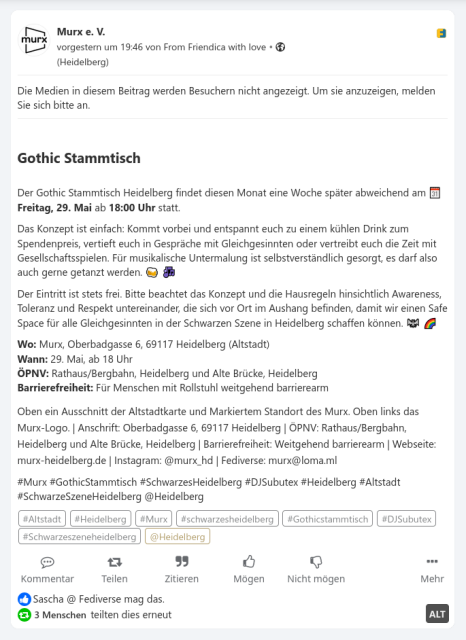
#Frage #Friendica #ÖffentlicherBeitrag #Medien #Video #Bild #Sichtbarkeit @Friendica Support

[strong]Gothic Stammtisch[/strong]
Der Gothic Stammtisch Heidelberg findet diesen Monat eine Woche später abweichend am 🗓️ [strong]Freitag, 29. Mai[/strong] ab [strong]18:00 Uhr[/strong] statt.
Das Konzept ist einfach: Kommt vorbei und entspannt euch zu einem kühlen Drink zum Spendenpreis, vertieft euch in Gespräche mit Gleichgesinnten oder vertreibt euch die Zeit mit Gesellschaftsspielen. Für musikalische Untermalung ist selbstverständlich gesorgt, es darf also auch gerne getanzt werden. 🍻 🎶
Der Eintritt ist stets frei. Bitte beachtet das Konzept und die Hausregeln hinsichtlich Awareness, Toleranz und Respekt untereinander, die sich vor Ort im Aushang befinden, damit wir einen Safe Space für alle Gleichgesinnten in der Schwarzen Szene in Heidelberg schaffen können. 🦇 🌈
[strong]Wo:[/strong] Murx, Oberbadgasse 6, 69117 Heidelberg (Altstadt)
[strong]Wann:[/strong] 29. Mai, ab 18 Uhr
[strong]ÖPNV:[/strong] Rathaus/Bergbahn, Heidelberg und Alte Brücke, Heidelberg
[strong]Barrierefreiheit:[/strong] Für Menschen mit Rollstuhl weitgehend barrierearm
#Murx #GothicStammtisch #SchwarzesHeidelberg #DJSubutex #Heidelberg #Altstadt #SchwarzeSzeneHeidelberg @Heidelberg

Not a big issue, but a bit distrubing is there an easy fix to that (besides switch back to Frio dark)
#question #friendica
Administration - Federation statistics
This page offers you the amount of known part of the federated social network your Friendica node is part of. These numbers are not complete and only reflect the part of the network your node is aware of.
Currently this node is aware of 45,339 nodes (2,255,139 active users last month, 4,189,933 active users last six months, 24,306,976 registered users in total) from the following platforms:
Friendica (450/29355)
Akkoma (584/15655)
BirdsiteLIVE (7/21616)
BookWyrm (114/30952)
Castopod (375/1264)
Cherrypick (58/8102)
Diaspora (51/229201)
firefish (Calckey) (35/3910)
Sharkey (537/25893)
Foundkey (4/10273)
Funkwhale (74/5826)
Gancio (217/3611)
Ghost (11518/11522)
Mastodon Glitch Edition (312/119884)
GNU Social/Statusnet (16/38)
GoToSocial (2359/3801)
Hometown (114/15283)
Honk (42/45)
Hubzilla/Red Matrix (170/14472)
iceshrimp (230/4355)
Lemmy (501/595175)
Mastodon (9248/13106196)
mbin (18/9546)
Microblog (98/99)
Misskey (1200/1182958)
Mobilizon (163/93791)
Nextcloud (20/20)
Nomad projects (Mistpark, Osada, Roadhouse, Streams. Zap) (5/7)
Owncast (320/324)
Peertube (1897/888907)
Pixelfed (741/1062016)
Pleroma (624/61952)
Plume (23/4088)
Postmarks (9/10)
ActivityPub Relay (138/139)
SocialHome (7/3786)
Snac (356/2189)
Takahē (31/666)
Wildebeest (3/3)
WordPress (10629/25614)
Write.as (4/4)
WriteFreely (757/134117)
Other (1280/6580311)
Friendica 450 apub
450 total systems
2,079 active users last month
5,053 active users last six months
29,355 registered users
1,163,408 locally created posts and comments
39.6 posts per user
65.2 users per system
3.1 (1)3.5.4 (1)2019.03 (2)2019.04 (1)2019.06 (3)2019.12 (1)2020.03 (2)2021.01 (3)2021.03-dev (1)2021.04 (2)2021.07 (1)2022.02 (1)2022.03 (4)2022.06 (1)2022.10 (4)2022.12 (2)2023.01 (6)2023.03-dev (1)2023.04-1 (1)2023.05 (8)2023.06 (3)2023.09-dev (1)2023.12 (2)2024.03 (13)2024.04 (1)2024.08 (11)2024.09-dev (1)2024.12 (72)2025.02-dev (6)2025.07-rc (11)2026.01 (236)2026.04-dev (21)2026.04-rc (20)2026.08-dev (6)
Akkoma 584 apub
584 total systems
2,455 active users last month
3,995 active users last six months
15,655 registered users
3,727,660 locally created posts and comments
238.1 posts per user
26.8 users per system
3.4.0 (2)3.5.0 (7)3.7.1 (2)3.8.0 (2)3.9.3 (12)3.10.2 (4)3.10.3 (4)3.10.4 (11)3.11.0 (1)3.12.0 (1)3.13.1 (4)3.13.2 (34)3.13.3 (5)3.14.0 (1)3.14.1 (8)3.15.1 (12)3.15.2+wl1 (2)3.15.2 (91)3.16.0 (40)3.17.0 (78)3.17.0+0 (1)3.18.0 (25)3.18.1 (131)3.19.0 (106)
BirdsiteLIVE 7 apub
7 total systems
24 active users last month
66 active users last six months
21,616 registered users
3,088.0 users per system
0.20.0 (1)1.0.0 (6)
BookWyrm 114 apub
114 total systems
1,388 active users last month
5,198 active users last six months
30,952 registered users
316,777 locally created posts and comments
10.2 posts per user
271.5 users per system
0.5.5 (1)0.6.0 (1)0.6.6 (2)0.7.1 (2)0.7.3 (1)0.7.4 (6)0.7.5 (11)0.8.0 (4)0.8.1 (2)0.8.2 (11)0.8.3 (13)0.8.4 (4)0.8.5 (56)
Castopod 375 apub
375 total systems
1,148 active users last month
1,195 active users last six months
1,264 registered users
7,479 locally created posts and comments
5.9 posts per user
3.4 users per system
develop_265cbbac (1)1.0.0 (3)1.0.5 (1)1.1.2 (9)1.2.4 (1)1.3.3 (1)1.4.1 (1)1.4.6 (1)1.5.0 (2)1.5.1 (1)1.5.2 (3)1.6.0 (1)1.6.5 (1)1.8.2 (1)1.9.0 (2)1.10.1 (1)1.10.5 (1)1.11.0 (7)1.12.1 (1)1.12.3 (2)1.12.4 (2)1.12.7 (1)1.12.9 (8)1.12.10 (1)1.12.11 (2)1.13.0 (7)1.13.1 (1)1.13.2 (2)1.13.3 (10)1.13.4 (46)1.13.5 (19)1.13.7 (17)1.13.8 (23)1.14.0 (6)1.14.1 (26)1.15.0 (2)1.15.1 (2)1.15.4 (53)1.15.5 (101)2.0.0 (5)
Cherrypick 58 apub
58 total systems
68 active users last month
113 active users last six months
8,102 registered users
2,372,618 locally created posts and comments
292.8 posts per user
139.7 users per system
4.14.0 (1)4.14.2+mk9 (1)4.14.2 (1)4.15.1 (3)4.16.0 (3)4.17.0 (43)4.18.0 (6)
Diaspora 51 dspr
51 total systems
2,150 active users last month
6,175 active users last six months
229,201 registered users
4,712,818 locally created posts and comments
20.6 posts per user
4,494.1 users per system
0.7.4.0 (1)0.7.10.0 (1)0.7.15.0 (1)0.7.18.0 (1)0.7.18.1 (1)0.7.18.2 (9)0.7.99.0 (1)0.9.0.0 (14)0.9.1.0 (14)0.10.0 (5)1.0.0 (3)
firefish (Calckey) 35 apub
35 total systems
284 active users last month
533 active users last six months
3,910 registered users
787,132 locally created posts and comments
201.3 posts per user
111.7 users per system
firefish-A.K:NoDM@20241205 (1)firefish-1.0.3 (3)firefish-1.0.4 (2)firefish-1.0.5-rc (2)calckey-13.1.0 (1)calckey-13.1.4.1 (3)calckey-14.0.0-rc (1)calckey-14.0.0-rc3 (1)firefish-20240216 (1)firefish-20240301 (2)firefish-20240413 (1)firefish-20240630 (2)firefish-20240714 (1)firefish-20240809 (1)firefish-20240818 (1)firefish-20240909 (2)firefish-20241121 (1)firefish-20241205.fork (1)firefish-20241205 (8)
Sharkey 537 apub
537 total systems
621,964 active users last month
1,645 active users last six months
25,893 registered users
11,098,243 locally created posts and comments
428.6 posts per user
48.2 users per system
Quollkey v1.2.1+g4596d7dcd3 (1)Quollkey v1.2.2+g2e9ba39a6c (1)2023.11.2 (1)2023.12.1 (1)2024.8.1 (1)2024.8.2 (3)2024.10.0.1-dev (1)2024.11.1 (2)2024.11.2 (7)2025.1.0-dev (1)2025.2.2 (7)2025.2.3 (2)2025.3.0-dev (2)2025.4.2-rc (1)2025.4.2 (3)2025.4.3 (3)2025.4.4 (39)2025.4.5 (27)2025.4.5.1 (1)2025.4.6-nik (1)2025.4.6 (385)2025.5.2-dev-stelpolva (5)2025.5.2-dev (2)2025.5.2 (40)
Foundkey 4 apub
4 total systems
185 active users last month
615 active users last six months
10,273 registered users
839,376 locally created posts and comments
81.7 posts per user
2,568.3 users per system
13.0.0 (4)
Funkwhale 74 apub
74 total systems
256 active users last month
947 active users last six months
5,826 registered users
78.7 users per system
1.1 (1)1.1.4 (2)1.2.0 (1)1.2.2 (1)1.2.7 (1)1.2.8 (2)1.2.9 (4)1.2.10 (2)1.3.1 (2)1.3.3 (2)1.3.4 (1)1.4.0.dev0 (5)1.4.0 (28)1.4.1 (21)2.0.0a2 (1)
Gancio 217 apub
217 total systems
14 active users last month
14 active users last six months
3,611 registered users
270,506 locally created posts and comments
74.9 posts per user
16.6 users per system
unknown (1)0.6.12 (1)1.4.4 (1)1.5.6 (1)1.18.0 (1)1.18.1 (1)1.18.9 (1)1.19.0 (3)1.19.4 (1)1.21.0 (4)1.23.1 (1)1.25.0 (10)1.25.1 (2)1.26.1 (5)1.27.0 (14)1.28.0-VM (1)1.28.0 (9)1.28.1 (11)1.28.2 (148)1.28.2.2 (1)
Ghost 11518 apub
11,518 total systems
38 active users last month
40 active users last six months
11,522 registered users
9,945 locally created posts and comments
0.9 posts per user
1.0 user per system
0.1.0 (11499)6.19 (4)6.22 (1)6.23 (1)6.27 (1)6.28 (1)6.30 (1)6.35 (2)6.37 (3)6.38 (1)6.39 (4)
Mastodon Glitch Edition 312 apub
312 total systems
15,301 active users last month
25,843 active users last six months
119,884 registered users
31,592,670 locally created posts and comments
263.5 posts per user
384.2 users per system
2.6.5+glitch (1)3.4.1+glitch (1)3.4.10+glitch+atsu1125 (2)3.5.2+glitch_0509_e8b8ac8 (1)3.5.3+glitch (1)3.5.17+glitch+brightfur (1)4.0.2+glitch (1)4.1.2+glitch+closedsocial (3)4.1.3+glitch+cutiecity (1)4.1.3+glitch (2)4.1.4+glitch (3)4.1.5+glitch (1)4.2.24+glitch+blobfox (1)4.3.0-alpha.3+glitch (1)4.3.1+glitch (3)4.3.2+glitch.donphan.social (1)4.3.4+glitch (2)4.3.5+glitch (4)4.3.6+glitch (1)4.3.8+glitch (3)4.3.9+glitch (1)4.3.16+glitch (1)4.3.17+glitch (1)4.4.1+glitch (6)4.4.2+glitch (1)4.4.3+glitch (1)4.4.4+glitch (1)4.4.5+glitch (1)4.4.6+glitch (1)4.4.8+glitch (1)4.4.13+glitch (1)4.5.0+glitch (3)4.5.1+glitch (2)4.5.2+glitch (3)4.5.3+glitch (9)4.5.4+glitch (7)4.5.5+glitch (5)4.5.6+glitch-th (1)4.5.6+glitch.vtsocial (1)4.5.6+glitch (9)4.5.7+glitch.vtsocial (1)4.5.7+glitch (15)4.5.8+glitch (59)4.5.8+glitch+0s (1)4.5.9+glitch.cathode (1)4.5.9+glitch.dftba (1)4.5.9+glitch.garden (1)4.5.9+glitch.techlgbt (1)4.5.9+glitch (139)4.5.9+sakyey.1.2.1.glitch (1)4.6.0-alpha.7+glitch.floofy (1)4.6.0-alpha.7+qdon.glitch (1)
GNU Social/Statusnet 16 stat
16 total systems
4 active users last month
4 active users last six months
38 registered users
35,514 locally created posts and comments
934.6 posts per user
2.4 users per system
hello world (1)1.1.1-release (1)1.1.3-beta3 (4)1.2.0-beta4 (5)1.20.9 (1)2.0.0 (1)2.0.1 (2)2.0.2 (1)
GoToSocial 2359 apub
2,359 total systems
159 active users last month
336 active users last six months
3,801 registered users
1,162,156 locally created posts and comments
305.8 posts per user
1.6 user per system
unknown (4)git (9)ls (1)v0.9.0 (1)v0.15.0 (1)v0.16.0 (3)v0.17.1 (1)v0.17.3 (1)v0.18.0 (1)v0.18.1 (1)v0.19.0 (2)v0.19.1 (4)v0.19.2 (1)v0.20.0 (11)v0.20.1 (2)v0.20.2 (7)v0.20.3 (5)v0.21.0 (27)v0.21.1 (3)v0.21.2 (17)0.3.7 (2)0.5.1 (1)0.5.2 (3)0.6.0 (3)0.7.0 (1)0.7.1 (1)0.9.0 (6)0.9.1 (1)0.10.0 (3)0.11.0 (2)0.11.1 (2)0.12.2 (1)0.13.2 (1)0.13.3 (1)0.14.0 (1)0.14.1 (1)0.14.2 (2)0.15.0 (4)0.15.1 (1)0.16.0 (21)0.17.0 (8)0.17.1 (1)0.17.2 (1)0.17.3 (36)0.17.4 (9)0.18.0 (7)0.18.1 (15)0.18.2 (7)0.18.3 (18)0.19.0 (28)0.19.1 (56)0.19.2 (32)0.20.0 (34)0.20.1 (81)0.20.2 (174)0.20.3 (125)0.21.0 (98)0.21.1 (174)0.21.2 (1293)3.3.0 (2)
Hometown 114 apub
114 total systems
2,741 active users last month
3,816 active users last six months
15,283 registered users
7,609,160 locally created posts and comments
497.9 posts per user
134.1 users per system
1.0.7+3.5.5 (1)4.0.2+hometown (1)4.0.6+hometown (3)4.0.13+hometown (2)4.0.15+hometown (4)4.2.10+hometown (3)4.2.17+hometown (25)4.5.6+hometown (4)4.5.7+hometown (63)4.5.9+hometown (8)
Honk 42 apub
42 total systems
4 active users last month
4 active users last six months
45 registered users
4,819 locally created posts and comments
107.1 posts per user
1.1 user per system
unknown (39)develop/git (1)develop/hg (2)
Hubzilla/Red Matrix 170 apub
170 total systems
1,192 active users last month
2,565 active users last six months
14,472 registered users
2,200,312 locally created posts and comments
152.0 posts per user
85.1 users per system
Red 6.5 (1)3.2.1 (1)4.0 (1)4.0.3 (1)5.4.2 (1)6.4.2 (1)7.0RC (1)7.0.3 (1)7.2.2 (2)7.6 (1)8.0 (3)8.2 (1)8.6 (1)8.6.1 (2)8.8.2 (1)8.8.7 (1)9.0.1 (3)9.2 (1)9.2.1 (1)9.4.3 (2)10.0.5 (1)10.0.6 (2)10.0.8 (4)10.2.1 (15)10.2.3 (15)10.4 (1)10.4.3 (1)10.4.4 (4)10.6 (3)10.6.1 (10)10.7.1 (1)11.0 (6)11.2 (75)11.3 (5)
iceshrimp 230 apub
230 total systems
872 active users last month
1,322 active users last six months
4,355 registered users
2,648,251 locally created posts and comments
608.1 posts per user
18.9 users per system
2023.12.6 (1)2023.12.8-dev (1)2023.12.9-dev (1)2023.12.9 (2)2023.12.11 (3)2023.12.13 (2)2023.12.14.shorks1 (1)2023.12.14+sophari.11 (1)2023.12.14-dev (5)2023.12.14 (30)2025.1 (54)2025.12.7+66bb0eaae2 (2)2026.1 (67)2026.4.1+eepy.zone (1)2026.4.1-dev (11)2026.4.1 (32)2026.4.2.withdrawal1 (1)2026.4.2-dev (6)2026.4.2 (9)
Lemmy 501 apub
501 total systems
27,901 active users last month
55,547 active users last six months
595,175 registered users
24,793,564 locally created posts and comments
41.7 posts per user
1,188.0 users per system
unknown version (2)nightly-2026 (1)0.16.7 (1)0.17.0 (1)0.17.3 (1)0.17.4 (2)0.18.1 (1)0.18.2 (2)0.18.4 (2)0.18.5 (4)0.19.2 (1)0.19.3 (12)0.19.4 (3)0.19.5 (10)0.19.6 (2)0.19.7 (3)0.19.8 (11)0.19.9 (8)0.19.10 (4)0.19.11 (27)0.19.12 (27)0.19.13 (49)0.19.14 (14)0.19.15 (63)0.19.16 (25)0.19.16-10 (1)0.19.17 (59)0.19.18 (160)0.19.18-1 (1)0.19.18-7 (2)1.0.0-alpha.12-74 (1)1.0.0 (1)
Mastodon 9248 apub
9,248 total systems
1,255,295 active users last month
2,943,309 active users last six months
13,106,196 registered users
1,122,592,284 locally created posts and comments
85.7 posts per user
1,417.2 users per system
unknown (2)Owncast (2)WordPress/6.8.5, (1)WordPress/6.9.1, (1)WordPress/6.9.2, (1)WordPress/6.9.4, (27)WordPress/7.0 (2)0.0.1 (1)0.21.2 (1)1 (13)1.2.2 (1)1.3.2 (1)1.4.1 (1)1.6.0 (1)1.6.1 (1)1.7.0 (2)2.4.2 (1)2.4.3 (1)2.4.5 (1)2.5.0 (1)2.6.2 (1)2.7.0 (2)2.8.0rc1 (1)2.8.0 (2)2.8.2 (2)2.9.2 (1)2.9.3 (1)3.0.0 (1)3.0.1 (4)3.1.1 (1)3.1.3 (4)3.1.4 (8)3.2.0 (5)3.2.1 (2)3.3.0 (10)3.4.0rc2 (1)3.4.0 (1)3.4.1 (11)3.4.3 (3)3.4.4 (2)3.4.6ht (1)3.4.6 (4)3.4.7 (1)3.4.8 (1)3.4.10 (2)3.5.0 (1)3.5.1 (1)3.5.2 (2)3.5.3 (40)3.5.5 (5)3.5.7 (3)3.5.8 (1)3.5.9 (3)3.5.10 (7)3.5.17 (1)3.5.18 (3)3.5.19 (18)3.5.19patch (1)4.0.0rc1 (1)4.0.0rc2 (1)4.0.0 (20)4.0.2 (71)4.0.4 (1)4.0.5 (2)4.0.6 (1)4.0.8 (1)4.0.10 (1)4.0.11 (1)4.0.12 (1)4.0.13 (3)4.0.14 (1)4.0.15 (7)4.1.0 (10)4.1.1 (5)4.1.2 (28)4.1.3 (9)4.1.4 (38)4.1.5 (6)4.1.6 (15)4.1.7 (6)4.1.9 (6)4.1.10 (2)4.1.11 (4)4.1.13 (9)4.1.15 (9)4.1.16 (6)4.1.18 (26)4.1.19 (5)4.1.20 (3)4.1.21 (2)4.1.22 (4)4.1.23 (2)4.1.24 (3)4.1.25 (15)4.2.0 (14)4.2.1 (35)4.2.3 (8)4.2.5 (15)4.2.6 (1)4.2.7 (16)4.2.8 (26)4.2.9 (4)4.2.10 (55)4.2.12 (24)4.2.13 (12)4.2.14 (2)4.2.15 (3)4.2.16 (1)4.2.17 (59)4.2.18 (13)4.2.19 (22)4.2.20 (22)4.2.21 (17)4.2.22 (10)4.2.23 (3)4.2.24 (11)4.2.25 (2)4.2.26 (9)4.2.27 (17)4.2.28 (9)4.2.29 (41)4.3.0 (39)4.3.1 (19)4.3.2 (18)4.3.3 (26)4.3.4 (111)4.3.5 (29)4.3.6 (79)4.3.7 (69)4.3.8 (105)4.3.9 (39)4.3.10 (6)4.3.11 (9)4.3.12 (5)4.3.13 (6)4.3.14 (19)4.3.15 (6)4.3.16 (16)4.3.17 (6)4.3.18 (10)4.3.19 (12)4.3.20 (11)4.3.21 (6)4.3.22 (34)4.4.0 (59)4.4.1 (29)4.4.2 (33)4.4.3 (86)4.4.4 (23)4.4.5 (68)4.4.6 (4)4.4.7 (13)4.4.8 (58)4.4.9 (4)4.4.10 (5)4.4.11 (9)4.4.12 (9)4.4.13 (6)4.4.14 (4)4.4.15 (18)4.4.16 (37)4.5.0 (128)4.5.1 (35)4.5.2 (102)4.5.3 (192)4.5.4 (110)4.5.5 (150)4.5.6 (242)4.5.7 (326)4.5.8 (707)4.5.9 (4744)4.6.0 (368)2026.03.02 (1)2026.03.03 (1)9001 (1)
mbin 18 apub
18 total systems
895 active users last month
2,038 active users last six months
9,546 registered users
279,213 locally created posts and comments
29.2 posts per user
530.3 users per system
1.8.4 (2)1.9.1 (7)1.10.0-rc1 (2)1.10.0-rc2 (7)
Microblog 98 apub
98 total systems
3 active users last month
3 active users last six months
99 registered users
5,130 locally created posts and comments
51.8 posts per user
1.0 user per system
microblog microblog hugo 0.91.2 (1)microblog hugo 0.117.0 (1)eleventy v4.0.0 (1)unknown (30)eleventy (1)microblog (3)hugo 0.91.2 (31)hugo 0.117.0 (7)hugo 0.158.0 (7)wordpress 5.2.1 (1)wordpress 6.1 (1)wordpress 6.2.9 (1)wordpress 6.6.5 (1)wordpress 6.7.1 (1)wordpress 6.7.5 (1)wordpress 6.8.5 (1)wordpress 6.9.4 (9)
Misskey 1200 apub
1,200 total systems
2,301 active users last month
5,500 active users last six months
1,182,958 registered users
428,674,371 locally created posts and comments
362.4 posts per user
985.8 users per system
estampie (1)hata (1)Nexus (1)1.4.4 (1)1.4.5 (1)11.37.1 (3)12.10.0 (1)12.75.0 (1)12.100.0 (1)12.108.1 (1)12.110.1 (1)12.119.0 (2)12.119.2 (13)12.120.0 (1)13.9.1 (1)13.9.2 (1)13.10.3 (1)13.13.2 (10)13.14.1 (2)13.14.2 (12)2023.9.3 (1)2023.10.0 (1)2023.10.2 (2)2023.11.0 (6)2023.11.1 (4)2023.12.2 (10)2024.2.0 (8)2024.3.1 (14)2024.5.0 (7)2024.7.0 (1)2024.8.0 (6)2024.9.0 (2)2024.10.0 (2)2024.10.1 (15)2024.10.2 (2)2024.11.0 (14)2025 (1)2025.1.0 (5)2025.2.0 (16)2025.2.1 (2)2025.3.0 (3)2025.3.1 (11)2025.3.2 (1)2025.4.0 (9)2025.4.1 (13)2025.5.0 (14)2025.5.1 (1)2025.6.0 (8)2025.6.1 (2)2025.6.3 (16)2025.7.0 (17)2025.8.0 (7)2025.9.0 (21)2025.10.0 (6)2025.10.1 (6)2025.10.2 (16)2025.11.0 (13)2025.11.1 (12)2025.12.0 (9)2025.12.1 (11)2025.12.2 (95)2026.1.0 (6)2026.2.0 (2)2026.3.0 (13)2026.3.1 (265)2026.3.2 (128)2026.4.0 (18)2026.5.0 (66)2026.5.1.md (1)2026.5.1 (217)2026.5.2 (8)2026.5.3 (10)
Mobilizon 163 apub
163 total systems
18 active users last month
18 active users last six months
93,791 registered users
630,014 locally created posts and comments
6.7 posts per user
575.4 users per system
unknown (1)main (1)2.0.2 (1)2.1.0 (3)3.0.4 (2)3.1.1 (1)3.2.0 (1)4.0.0 (1)4.0.2 (2)4.1.0 (8)5.0.1 (1)5.1.0 (14)5.1.1 (1)5.1.2 (3)5.1.3 (3)5.1.4 (5)5.1.5 (21)5.2.0 (15)5.2.1 (2)5.2.2 (23)5.2.3 (54)
Nextcloud 20 apub
20 total systems
20 registered users
1.0 user per system
0.6.0 (2)0.6.1 (13)0.7.0 (4)0.8.0 (1)
Nomad projects (Mistpark, Osada, Roadhouse, Streams. Zap) 5 apub
5 total systems
1 active user last month
1 active user last six months
7 registered users
7 locally created posts and comments
1.0 post per user
1.4 user per system
streams 22.09.25 (1)zap 22.12.30 (1)osada 22.12.30 (1)streams 26.2.10 (1)streams 26.2.14.1 (1)
Owncast 320 apub
320 total systems
250 active users last month
250 active users last six months
324 registered users
25,597 locally created posts and comments
79.0 posts per user
1.0 user per system
idn-arm64 (1)v0.1.0 (2)dev (9)0.0.11 (2)0.0.12 (3)0.0.13 (5)0.1.0 (3)0.1.1 (5)0.1.2 (8)0.1.3 (16)0.2.0 (2)0.2.1 (17)0.2.2 (3)0.2.3 custom 20250920 (1)0.2.3 (68)0.2.4 (52)0.2.5 (122)20230513 (1)
Peertube 1897 apub
1,897 total systems
51,165 active users last month
176,125 active users last six months
888,907 registered users
6,216,196 locally created posts and comments
7.0 posts per user
468.6 users per system
unknown (10)1.1.0 (1)1.2.1 (1)2.0.0 (1)2.3.0 (4)2.4.0 (4)3.0.0 (2)3.0.1 (4)3.1.0 (4)3.2.0 (1)3.2.1 (6)3.3.0 (1)3.4.0 (1)3.4.1 (4)4.0.0 (2)4.1.1 (5)4.2.0 (1)4.2.1 (1)4.2.2 (17)4.3.0 (7)4.3.1 (4)5.0.0 (2)5.0.1 (11)5.1.0 (16)5.2.0 (7)5.2.1 (36)6.0.0 (2)6.0.1 (3)6.0.2 (8)6.0.3 (18)6.0.4 (13)6.1.0 (19)6.2.0 (5)6.2.1 (15)6.3.0 (4)6.3.1 (2)6.3.2 (7)6.3.3 (41)7.0.0 (11)7.0.1 (48)7.1.0 (14)7.1.1 (43)7.2.0 (22)7.2.1 (30)7.2.2 (10)7.2.3 (56)7.3.0 (312)8.0.0 (19)8.0.1 (79)8.0.2 (117)8.1.0 (3)8.1.1 (11)8.1.2 (22)8.1.3 (66)8.1.4 (64)8.1.5 (673)8.2.0-rc.1-nightly-2026 (1)8.2.0 (6)
Pixelfed 741 apub
741 total systems
89,874 active users last month
430,843 active users last six months
1,062,016 registered users
43,211,443 locally created posts and comments
40.7 posts per user
1,433.2 users per system
0.10.10 (2)0.11.0 (1)0.11.1 (1)0.11.2 (3)0.11.3 (2)0.11.4 (4)0.11.5 (1)0.11.6 (1)0.11.7 (1)0.11.8 (6)0.11.9 (4)0.11.11 (1)0.11.12 (3)0.11.13 (3)0.12.1 (4)0.12.3 (12)0.12.4+glitch.1.8.0 (1)0.12.4+glitch.1.10.0 (1)0.12.4 (23)0.12.5+glitch.1.10.1 (5)0.12.5 (46)0.12.6+glitch.1.12.1? (2)0.12.6+glitch.1.12.1 (28)0.12.6 (157)0.12.7 (429)
Pleroma 624 apub
624 total systems
4,514 active users last month
8,457 active users last six months
61,952 registered users
15,524,529 locally created posts and comments
250.6 posts per user
99.3 users per system
1.0.6 (1)2.0.6 (1)2.1.2 (2)2.1.50 (1)2.2.1 (1)2.2.2 (1)2.2.50 (1)2.3.0 (3)2.4.1 (4)2.4.2 (3)2.4.3 (1)2.4.4 (3)2.4.5 (3)2.4.53+soapbox (2)2.4.53 (11)2.5.0 (19)2.5.1 (7)2.5.2 (11)2.5.4 (3)2.5.5+debian.1.1 (1)2.5.5 (9)2.5.50 (5)2.5.51 (3)2.5.52 (7)2.5.54 (4)2.6.0 (5)2.6.1 (9)2.6.2 (9)2.6.3 (17)2.6.50 (26)2.6.51 (2)2.7.0 (15)2.7.1 (5)2.8.0 (36)2.9.0 (4)2.9.1 (139)2.9.2 (1)2.10.0+debian.1 (1)2.10.0 (144)2.10.2 (101)
Plume 23 apub
23 total systems
4,088 registered users
52,697 locally created posts and comments
12.9 posts per user
177.7 users per system
0.4.0 (1)0.7.2 (11)0.7.3-dev (10)0.7.3-ale (1)
Postmarks 9 apub
9 total systems
9 active users last month
9 active users last six months
10 registered users
1,628 locally created posts and comments
162.8 posts per user
1.1 user per system
0.0.1 (9)
ActivityPub Relay 138 apub
138 total systems
94 active users last month
94 active users last six months
139 registered users
1.0 user per system
selective-relay-0.2.3 (1)pub-relay-0.2.0-a2 (2)pub-relay-0.2.1 (1)aoderelay-v0.3.102 (2)aoderelay-v0.3.104 (1)aoderelay-v0.3.104+musubi (1)aoderelay-v0.3.104-HEAD (2)aoderelay-v0.3.104-main (1)aoderelay-v0.3.105-HEAD (1)aoderelay-v0.3.106-neighborhood (1)aoderelay-v0.3.113 (1)aoderelay-v0.3.113-HEAD (1)aoderelay-v0.3.114-HEAD (1)aoderelay-v0.3.115-HEAD (4)aoderelay-v0.3.116 (4)aoderelay-v0.3.116-HEAD (14)aoderelay-v0.3.116-main (2)aoderelay-v0.3.117-HEAD (5)aoderelay-v0.3.119 (7)aoderelay-v0.3.119-main (1)aoderelay-v0.3.119-max (1)aoderelay-v0.3.120-HEAD (4)aoderelay-v0.3.120-main (1)aoderelay-v0.3.121 (2)aoderelay-v0.3.121-HEAD (29)aoderelay-v0.3.121-main (1)aoderelay-v0.3.52-HEAD (1)aoderelay-v0.3.82-HEAD (2)aoderelay-v0.3.85-HEAD (5)aoderelay-v0.3.98-HEAD (1)activityrelay-0.0.1 (1)activityrelay-0.1 (3)activityrelay-0.2.0 (1)activityrelay-0.2.2 (5)activityrelay-0.2.3 (13)activityrelay-0.2.4 (5)activityrelay-0.3.2 (1)activityrelay-0.3.5 (9)
SocialHome 7 dspr
7 total systems
24 active users last month
91 active users last six months
3,786 registered users
51,655 locally created posts and comments
13.6 posts per user
540.9 users per system
0.18.0-dev (1)0.20.0 (2)0.22.0 (1)0.23.0 (3)
Snac 356 apub
356 total systems
105 active users last month
190 active users last six months
2,189 registered users
51,375 locally created posts and comments
23.5 posts per user
6.1 users per system
2.31-dev (2)2.36-dev (1)2.45 (3)2.52-dev (1)2.55 (1)2.62 (1)2.68 (2)2.69 (1)2.70 (1)2.72-dev (1)2.73 (2)2.75-dev (1)2.75 (20)2.76-dev (1)2.77 (2)2.78-dev (1)2.78 (1)2.79-dev (1)2.80 (2)2.80-20250709 (1)2.81-dev (2)2.81 (3)2.82 (1)2.83-dev (1)2.83 (5)2.84 (10)2.85-dev (5)2.85 (4)2.86-dev (3)2.86 (2)2.87 (3)2.88 (7)2.89 (21)2.90-dev (8)2.90 (27)2.91-dev (6)2.91 (94)2.92-dev (36)2.92 (72)
Takahē 31 apub
31 total systems
666 registered users
124,536 locally created posts and comments
187.0 posts per user
21.5 users per system
0.9.0 (4)0.10.1 (9)0.11.0 (9)0.12.0 (9)
Wildebeest 3 apub
3 total systems
3 registered users
1.0 user per system
0.0.1 (2)0.1.0 (1)
WordPress 10629 apub
10,629 total systems
12,802 active users last month
13,141 active users last six months
25,614 registered users
21,958,567 locally created posts and comments
857.3 posts per user
2.4 users per system
unknown (4)0.2 (1)4.9.3 (1)5.0.21 (1)5.1.22 (1)5.5 (1)5.7 (1)5.8 (1)5.8.13 (1)5.9 (1)6.0 (1)6.0.11 (2)6.1 (1)6.1.1 (3)6.1.9 (1)6.1.10 (9)6.2 (19)6.2.3 (1)6.2.8 (1)6.2.9 (15)6.3 (4)6.3.2 (1)6.3.7 (1)6.3.8 (7)6.4 (11)6.4.2 (2)6.4.8 (9)6.5 (17)6.5.8 (3)6.6 (31)6.7 (64)6.7.2 (2)6.7.4 (1)6.7.5 (9)6.8 (185)6.8.2 (2)6.8.3 (2)6.8.5 (3)6.9 (4446)6.9.1 (1)6.9.2 (1)6.9.4 (82)7.0 (5678)7.1 (1)
Write.as 4 apub
4 total systems
4 registered users
1.0 user per system
unknown (4)
WriteFreely 757 apub
757 total systems
1,836 active users last month
9,870 active users last six months
134,117 registered users
374,308 locally created posts and comments
2.8 posts per user
177.2 users per system
unknown (30)0.8.1 (1)0.12.0 (7)0.12.0-277 (1)0.13.0 (1)0.13.1 (14)0.13.2 (19)0.14.0 (14)0.14.0-126 (1)0.14.0-132 (1)0.14.0-141 (1)0.14.0-146 (1)0.15.0 (35)0.15.1-c7 (1)0.15.1 (72)0.15.1-1 (1)0.16.0+tedomum.1 (1)0.16.0 (542)0.16.0-2 (1)0.16.0-10 (2)0.16.0-18 (1)0.16.0-19 (1)0.16.0-27 (1)0.16.0-69 (1)0.16.0-72 (1)0.16.0-85 (2)0.16.0-108 (2)0.16.0-131 (1)0.16.1 (1)
Other 1280 apub
1,280 total systems
155,726 active users last month
484,968 active users last six months
6,580,311 registered users
103,998,535 locally created posts and comments
15.8 posts per user
5,140.9 users per system
-heureum- (1)4m3-a-p-s--streams (1)abelio (1)activities.next (2)activity-pub-relay (4)activity-relay (16)activitypub-agent-server (1)activitypub-bot (3)activitypub-firebase (2)activitypub-server (1)agate (1)agora of flancia (1)ahodon (1)aktor (1)anglesite (1)aoba (1)ap-relay (1)ap.39sho (1)apd (2)appy (2)areionskey (1)arrcay (2)astro-activitypub (1)awakari (1)badgefed (6)baudrate (1)betula (22)bird.meetup (1)bloedsuikerbaas-activitypub (1)blogger (1)bonfire (37)bonfou (1)bookshelf (1)bovine (1)bridgy-fed (7)brighteon (3)broca (1)bugle (1)bunny-of-doom (1)burogu (1)buzzrelay (3)cagando (1)capubara (2)case-streams (1)caselibre (1)castling.club (1)catodon (10)ccworld-ap-bridge (14)changinggraph (1)changkyun-kim (1)chara-social (1)chat (2)chess.game.infinito.nexus (1)chuckya (2)ciu (2)civic-hub (1)clanspub (1)clipsymphony activitypub service (7)clubsall (1)cluckey (1)codename merp (1)coma (3)comal (1)commonpub (1)communitarium-community-media (1)contentnation (1)cookifed (1)coolockvillage.ie (1)coresignal (1)custom-server (1)d250g2 (1)dailyrucks (2)daism (1)dch_blog (1)dev-macgirvin (1)diablo-canyon2 (1)die-ultrawandern-community (1)discourse (40)diskrot (1)ditto (2)divedb (1)dolphin (2)dope-network (2)drupal (14)dutch beer collective (1)e-komik gallery (1)ecko (1)egregoros (2)ehlabs (1)eindex-blog (1)elektrine (4)eleventy (1)elgg (3)emissary (10)emoji ranking v2 activitypub (1)encryptr-net (1)encyclia (1)enigma-bbs (2)enigmatick (1)epicyon (1)everycal (1)exerra's blog - prerelease fedi version (1)factsheet-six (1)famweb (1)feddyspice (1)federated-activity-publisher (1)fedibird (2)fedibook (2)fedibot (1)fedichatbot (1)fediforum (1)fedify-example-blog (1)fediloc (1)fediman (1)fedipage (6)fedirouter (1)fedisky (2)fediverse relay (1)feeder (1)feediverse (1)finalboss (1)flipboard (1)flohmarkt (24)forgejo (75)forte (20)forte-canyon (1)framepress (1)frequency (1)gaelicwizard.me (1)garden (1)gathio (11)get-ready-to-rumbly (1)gharab-tzereq (6)gitea (4)glitchcafe (1)goblin (1)goblog (5)groundpolis-milkey (1)gush (1)hackerspub (1)handle (1)harmony (2)hatsu (6)hexo (1)hickey (2)hollo (34)holos (19)holos-discover (1)hourlyphoto (1)hugo (11)hule (1)ibis (3)imoxia-www (1)imp (1)incestoma (4)incise (1)indiekit (1)infotograf (1)inkwell (1)irwin (1)itinerariummentis (1)johnson-fyi-blog (1)jss (1)juick (1)justiciaathina (1)kate.wtf & 11ty (2)kiiteitte (1)klaxon (2)kmyblue (22)known (2)kotori (2)kroeg (2)ktistec (14)labas (1)lazcorpsite (1)letter (1)lightfall (1)likestream (1)litepub (2)lookslike.pascal.codes (1)loops (28)lotide (1)madblog (3)mammuthus (11)manifest-commons (1)manyfold (6)matters-fediverse-gateway (3)mdverse (1)meisskey (9)merprelay (1)metazine (2)microblogpub (37)microdotblog (1)miniwiki (1)mischief (1)mitra (62)mitra cl (2)mixednutz (1)mixpal (1)mk-go (2)moim (1)momostr (1)monoplace.ca (1)mostr (1)motivation (1)moviebuff (1)movies-diary (2)movietitler (1)murlog (4)musicsocial (1)n/a (1)nanasi-apps.xyz relay service (1)neko (1)nekonoverse (2)neodb (15)neogroup (1)nevulounge (1)newsdiff (1)newssite-ap (3)nexkey (1)nginx (2)nix-s1-visions (1)nodebb (62)noorisk (1)notes (1)notestock (2)ohagi (2)oni (3)open streaming platform (1)openlink-virtuoso (2)orizuru (2)outpost (1)owl-blogs (1)p3k (1)pandacap (2)paon (2)pasta-activitypub (1)paul.kinlan.me (1)pawfed (1)pawkey (1)peermesh-pm-module-social (1)pelago (1)pelican (1)pelican-activitypub (2)petitchambre (1)pichuchen.tw-webserver (1)piefed (83)pinka (2)podcast-peformance (1)podfriend (1)ponos (1)pricelessmisc-blog (1)prismo (1)private (1)psh (1)publii (2)pulsar (1)qaperture (1)qoto (2)quolibet (1)rayven (1)reisetagebuch (1)revix (1)robgreeley-com (1)robida (1)ruby-news-kr (1)rullen (2)ryanw.eu (1)scenes-cloud (2)scrapblog (1)seos (1)sequel (2)sharkey 2025.4.5; like (2)sharkey 2025.4.6; like (3)sharkey 2025.5.2-dev; like (1)sharkey hata-11.0 (for sharkey 2025.4.6); like (1)shops (1)siliconbeest (1)sinokey (1)smithereen (3)social-blog (2)social-kofo (1)socialband (1)solaristreams (1)squidcity (1)starling (4)stegodon (3)stonenet (1)streams-at-els-mussols (1)streams-flamenco (1)streams-wivodaim-ch (1)sukhi-fedi (1)sutty-distributed-press (69)tacuruses (1)takesama (1)tech-port relay service (1)telepico (1)tens-city (1)the-foundation (1)thiswasnews (2)tinyap (2)tinypub (1)tiofomento-fedverse-bot (1)tism (1)tokoroten (1)tomh.nl (1)toot-worker (1)touchgrass (1)tumeeto (1)tunecamp (1)turtkey (1)tvmarks (2)twotwofour (1)typent (1)uberblogr-activitypub (1)unio-diversi-spiritus (1)unknown (1)unspoken (1)uwuzu (3)verces (1)vernissage (9)wafrn (31)wallog (1)waq (1)watney (1)webfan (2)wellesley (5)wx-watch (1)wxwclub (2)x-log (1)xbuddy (3)yellbot (1)yoiyami (4)yojo-art (8)yplev (1)yt-on-fedi (1)yunohost-streams (3)zeitgeist (1)zer0 (2)μpub (1)ぷよ橋activitypub (1)
That is an insane amount of data, and a fairly accurate one, I believe your numbers are right, but in relation to what you have read, they only report the numbers they either see, or that represent the message they are trying to convey, just my 2 cents;
Why does #Racoon for #Friendica show a shared Diaspora post as blank?

 @Friendica Support
Again I make no claims of actual usability or benefit, as of posting this it seems to be working well on my #friendica instance;
Crons
# --- Friendica Automation Suite ---
MAILTO="your-email@domain.com"
SHELL="/bin/bash"

# Core background tasks
0 */1 * * * /home/USER/friendica_cron.sh >/dev/null 2>&1
*/15 * * * * /usr/bin/flock -n /tmp/fc_worker.lock -c cd /home/USER/public_html && bin/console worker >/dev/null 2>&1

# Maintenance: Monthly Smarty purge (1st of the month)
0 0 1 * * /usr/bin/rm -rf /home/USER/public_html/view/smarty/compile/* >/dev/null 2>&1

# Maintenance: Weekly Storage & Cache clearing (Sundays)
0 1 * * 0 cd /home/USER/public_html; bin/console storage clear >/dev/null 2>&1
30 1 * * 0 cd /home/USER/public_html; bin/console cache clear >/dev/null 2>&1

# Watchdogs: StayAlive & Bouncer
@reboot /bin/bash /home/USER/scripts/StayAlive.sh > /dev/null 2>&1 &
0 * * * * pgrep -f StayAlive.sh > /dev/null || /bin/bash /home/USER/scripts/StayAlive.sh > /dev/null 2>&1 &

@reboot /bin/bash /home/USER/scripts/bouncer.sh > /dev/null 2>&1 &
* * * * * pgrep -f bouncer.sh > /dev/null || /bin/bash /home/USER/scripts/bouncer.sh > /dev/null 2>&1 &
README
⚙️ The Friendica Automation Suite (Crontab)
Scheduled Maintenance & Self-Healing Guards
This configuration file acts as the "Brain" of your Friendica instance. It manages the scheduling for background tasks, periodic cache cleaning, and—most importantly—ensures your custom stability scripts (Bouncer and StayAlive) never stop running.
⚠️ Implementation Note: Replace YOUR_HOME, YOUR_USER, and YOUR_INSTANCE_ROOT with your actual server paths.
These Crons are provided "as-is" for educational and personal use.
They will not be maintained or updated.
No support or bug fixes will be provided.
Use at your own risk..
🛠 What This Schedule Manages
1. Core Background Tasks
Hourly Maintenance: Runs friendica_cron.sh to handle general background cleanup.
Frequent Worker: Executes the Friendica worker every 15 minutes to keep the federation queue moving.
2. Housekeeping & Performance
To prevent disk bloat and keep the interface snappy, the following cleanup tasks are automated:
Monthly Smarty Purge: Clears compiled template files on the 1st of every month to refresh the UI engine.
Weekly Storage Cleanup: Clears the avatar and storage cache every Sunday at 1:00 AM.
Weekly Node Cache: Flushes the node cache every Sunday at 1:30 AM to keep remote directory info fresh.
3. The "Immortal" Guard System
The most critical part of this setup is the Watchdog for the Watchdogs.
Boot Persistence: Both the StayAlive.sh (Service Guard) and bouncer.sh (Resource Throttle) are set to trigger immediately upon a server reboot (@reboot).
The Safety Check: Every hour (for StayAlive) and every minute (for the Bouncer), the system checks if the scripts are still running. If they’ve been killed by the system, it automatically restarts them.
📋 Installation
To apply these rules to your server:
Open your crontab editor:
Bash
crontab -e
Paste the configuration, ensuring your paths are correct.
Save and exit.
🔍 Pro-Tip: Monitoring
You have MAILTO set at the top. If your server is configured for mail, any errors from these tasks will be sent directly to your inbox. If you prefer to log to a file instead, you can change the >/dev/null 2>&1 at the end of the lines to >> ~/cron_log.txt 2>&1.
Bouncer
#!/bin/bash

# These are the Bouncer's Rules
MAX_KIDS=3        # Only 3 people in the kitchen at once
MAX_HEAT=2        # Only 2% energy allowed
CHECK_TIME=5      # Wait 5 seconds before checking again

while true
do
  # 1. Count how many 'lsphp' workers are busy with your site
  CURRENT_KIDS=$(pgrep -f "lsphp.*YOUR_INSTANCE_ROOT" | wc -l)

 # Lower priority for all lsphp processes to keep the server cool
    pgrep -u *YOUR_USER lsphp | xargs -r renice -n 15 > /dev/null 2>&1

  # 2. If there are more than 3...
  if [ "$CURRENT_KIDS" -gt "$MAX_KIDS" ]; then
    echo "Bouncer: Too many kids! Making the extras wait in the hallway."

    # This finds the newest workers and tells them to 'STOP' (Pause)
    # They stay in line, but they don't use any CPU while paused.
    pgrep -f "lsphp.*YOUR_INSTANCE_ROOT" | tail -n +$((MAX_KIDS+1)) | xargs kill -STOP

    # Wait for things to cool down
    sleep $CHECK_TIME

    # Tell them they can 'CONT' (Continue) ONE BY ONE
        echo "$EXTRAS" | while read -r kid_pid; do
            if [ ! -z "$kid_pid" ]; then
                kill -CONT "$kid_pid"
                echo "Bouncer: Letting kid $kid_pid back in."
                sleep 1
            fi
        done
  fi

  # Take a small breath so the Bouncer doesn't get tired
  sleep 1
done
README
🚪 The LSPHP Bouncer
Resource Throttle & Process Queue for Shared Hosting
The LSPHP Bouncer is a lightweight Bash watchdog designed for users on LiteSpeed-based hosting. It prevents your account from hitting "Resource Limit Reached" errors (508 errors) by pausing excess PHP processes (lsphp) instead of letting them crash the site or trigger a provider-level kill.
⚠️ Maintenance Notice
This project is provided "as-is" for educational and personal use.
It will not be maintained or updated.
No support or bug fixes will be provided.
Use at your own risk..
🧐 How It Works
LiteSpeed servers often spawn many lsphp workers to handle incoming traffic. If too many start at once, your host might lock your account for exceeding CPU or process limits.
The Headcount: Every second, the Bouncer counts how many PHP workers are active for your specific site.
The Velvet Rope: If the count exceeds your MAX_KIDS limit, the Bouncer sends a SIGSTOP signal to the extra processes. This pauses them—they stay in the queue but stop consuming CPU cycles.
The Entry: After a short cooldown (CHECK_TIME), the Bouncer sends a SIGCONT signal, letting those processes finish their work one by one.
🛠 Configuration
Open the script and adjust these "House Rules" to match your hosting plan:
MAX_KIDS: The maximum number of PHP processes you are allowed (e.g., 3).
CHECK_TIME: How many seconds to pause the "extras" before letting them work again.
Process Filter: The script looks for "lsphp.*your.domain". Ensure the string matches what shows up in your process monitor (usually top or htop).
🚀 Setup & Execution
1. Make it Executable
Bash
chmod +x bouncer.sh
2. Run the Bouncer
To keep the Bouncer running even after you log out of SSH:
Bash
nohup ./bouncer.sh > /dev/null 2>&1 &
📈 Why use this?
Avoids 508 Errors: Instead of the server showing a "Limit Reached" page, the site just feels a tiny bit slower while the Bouncer staggers the load.
CPU Friendly: Paused processes (kill -STOP) consume zero CPU, helping you stay under the "Energy" or "Heat" limits of your host.
Specific Targeting: Using pgrep -f, it only targets your specific site's workers, leaving other processes alone.
Persistent Service Guard
#!/bin/bash

# --- CONFIGURATION (Users change these) ---
# The absolute path to your application root
SITE_ROOT="/path/to/your/app"

# The path to the PHP binary (usually 'php' or a specific version)
PHP_CLI="/usr/bin/php"

# Name of the console executable
CONSOLE_APP="bin/console.php"

# Where to save the logs
LOG_FILE="./guard_log.txt"

# List of services to monitor
SERVICES=("daemon" "jetstream")

# --- CORE LOGIC (Do not edit below) ---
CONSOLE_PHP="$SITE_ROOT/$CONSOLE_APP"

echo "$(date): Persistent Guard started for services: ${SERVICES[*]}" >> "$LOG_FILE"

while true; do
    for SERVICE in "${SERVICES[@]}"; do
        # Check status
        STATUS=$($PHP_CLI $CONSOLE_PHP $SERVICE status 2>&1)

        if [[ "$STATUS" != *"is running"* ]]; then
            echo "$(date): $SERVICE is DOWN. Attempting start..." >> "$LOG_FILE"
            $PHP_CLI $CONSOLE_PHP $SERVICE start >> "$LOG_FILE" 2>&1
        fi
    done
    sleep 60
done
README
Persistent Service Guard
A robust, lightweight Bash-based watchdog script designed to monitor and automatically restart background services (such as Friendica daemons or Jetstream workers) for PHP-based applications.
⚠️ Maintenance Notice
This project is provided "as-is" for educational and personal use.
It will not be maintained or updated.
No support or bug fixes will be provided.
Use at your own risk.
🚀 What It Does
The Service Guard addresses the common issue where background processes or daemons on shared or private hosting may crash or be killed by the system.
Active Monitoring: It loops indefinitely, checking the status of defined services every 60 seconds.
Automatic Recovery: If a service is reported as "not running," the script immediately attempts to restart it.
Logging: Every check, failure, and restart attempt is timestamped and recorded for auditing.
🛠 Setup & Usage
1. Configuration
Before running, ensure the following variables in guard.sh match your environment:
SITE_ROOT: The absolute path to your application root.
PHP_CLI: The path to the PHP binary (e.g., /usr/bin/php).
SERVICES: The names of the services to monitor (e.g., "daemon" "jetstream").
2. Permissions
Grant execution rights to the script:
Bash
chmod +x guard.sh
3. Execution
Run the script in the background to ensure it persists after your session ends:
Bash
nohup ./guard.sh > /dev/null 2>&1 &
📊 Managing Logs
The script appends data to guard_log.txt. To prevent this file from consuming excessive disk space, use one of the following methods:
Manual Truncation
Clear the log without stopping the script:
Bash
> guard_log.txt
Automatic Log Rotation (Improvement Example)
To automate log management, add this logic inside the while loop of the script:
Bash
# Improvement: Simple Log Rotation
MAX_SIZE=1048576 # 1MB in bytes
FILE_SIZE=$(stat -c%s "$LOG_FILE")
if [ "$FILE_SIZE" -gt "$MAX_SIZE" ]; then
echo "$(date): Log rotated (size limit reached)" > "$LOG_FILE"
fi
📈 Potential Improvements
Users wishing to extend the script's functionality can implement the following:
1. Auto-Discovery
Replace the hardcoded PHP_CLI path with dynamic discovery:
Bash
PHP_CLI=$(which php)
2. Failure Notifications
Integrate curl to send alerts to Discord or Telegram when a service fails:
Bash
# Discord Notification Example
curl -H "Content-Type: application/json" -X POST -d "{\"content\": \"⚠️ Alert: $SERVICE has crashed. Restarting...\"}" YOUR_WEBHOOK_URL
3. Dependency Validation
Add a check to verify the application exists before the loop starts:
Bash
if [ ! -f "$CONSOLE_PHP" ]; then
echo "Error: Console application not found at $CONSOLE_PHP"
exit 1
fi
⚖️ License (MIT)
Copyright (c) 2026 pasjrwoctx👽 (Philip A. Swiderski Jr.)
Permission is hereby granted, free of charge, to any person obtaining a copy of this software and associated documentation files (the "Software"), to deal in the Software without restriction, including without limitation the rights to use, copy, modify, merge, publish, distribute, sublicense, and/or sell copies of the Software, and to permit persons to whom the Software is furnished to do so, subject to the following conditions:
The above copyright notice and this permission notice shall be included in all copies or substantial portions of the Software.
THE SOFTWARE IS PROVIDED "AS IS", WITHOUT WARRANTY OF ANY KIND, EXPRESS OR IMPLIED, INCLUDING BUT NOT LIMITED TO THE WARRANTIES OF MERCHANTABILITY, FITNESS FOR A PARTICULAR PURPOSE AND NONINFRINGEMENT. IN NO EVENT SHALL THE AUTHORS OR COPYRIGHT HOLDERS BE LIABLE FOR ANY CLAIM, DAMAGES OR OTHER LIABILITY, WHETHER IN AN ACTION OF CONTRACT, TORT OR OTHERWISE, ARISING FROM, OUT OF OR IN CONNECTION WITH THE SOFTWARE OR THE USE OR OTHER DEALINGS IN THE SOFTWARE
@Friendica Support @Friendica Developers @Friendica Admins
You can encourage my continued useless ideas, and by doing so your helping to feed, house and clothe a #disabled man living in #poverty, $5-10-15 It All Helps, via #cashapp at $woctxphotog or via #paypal at https://www.paypal.com/donate?campaign_id=5BN5MB5BVQL22
# --- Friendica Automation Suite ---
MAILTO="your-email@domain.com"
SHELL="/bin/bash"
# Core background tasks
0 */1 * * * /home/USER/friendica_cron.sh >/dev/null 2>&1
*/15 * * * * cd /home/USER/public_html; bin/console worker >/dev/null 2>&1
# Maintenance: Monthly Smarty purge (1st of the month)
0 0 1 * * /usr/bin/rm -rf /home/USER/public_html/view/smarty/compile/* >/dev/null 2>&1
# Maintenance: Weekly Storage & Cache clearing (Sundays)
0 1 * * 0 cd /home/USER/public_html; bin/console storage clear >/dev/null 2>&1
30 1 * * 0 cd /home/USER/public_html; bin/console cache clear >/dev/null 2>&1
# Watchdogs: StayAlive & Bouncer
@reboot /bin/bash /home/USER/scripts/StayAlive.sh > /dev/null 2>&1 &
0 * * * * pgrep -f StayAlive.sh > /dev/null || /bin/bash /home/USER/scripts/StayAlive.sh > /dev/null 2>&1 &
@reboot /bin/bash /home/USER/scripts/bouncer.sh > /dev/null 2>&1 &
* * * * * pgrep -f bouncer.sh > /dev/null || /bin/bash /home/USER/scripts/bouncer.sh > /dev/null 2>&1 &
README
⚙️ The Friendica Automation Suite (Crontab)
Scheduled Maintenance & Self-Healing Guards
This configuration file acts as the "Brain" of your Friendica instance. It manages the scheduling for background tasks, periodic cache cleaning, and—most importantly—ensures your custom stability scripts (Bouncer and StayAlive) never stop running.
⚠️ Implementation Note: Replace YOUR_HOME, YOUR_USER, and YOUR_INSTANCE_ROOT with your actual server paths.
These Crons are provided "as-is" for educational and personal use.
They will not be maintained or updated.
No support or bug fixes will be provided.
Use at your own risk..
🛠 What This Schedule Manages
1. Core Background Tasks
Hourly Maintenance: Runs friendica_cron.sh to handle general background cleanup.
Frequent Worker: Executes the Friendica worker every 15 minutes to keep the federation queue moving.
2. Housekeeping & Performance
To prevent disk bloat and keep the interface snappy, the following cleanup tasks are automated:
Monthly Smarty Purge: Clears compiled template files on the 1st of every month to refresh the UI engine.
Weekly Storage Cleanup: Clears the avatar and storage cache every Sunday at 1:00 AM.
Weekly Node Cache: Flushes the node cache every Sunday at 1:30 AM to keep remote directory info fresh.
3. The "Immortal" Guard System
The most critical part of this setup is the Watchdog for the Watchdogs.
Boot Persistence: Both the StayAlive.sh (Service Guard) and bouncer.sh (Resource Throttle) are set to trigger immediately upon a server reboot (@reboot).
The Safety Check: Every hour (for StayAlive) and every minute (for the Bouncer), the system checks if the scripts are still running. If they’ve been killed by the system, it automatically restarts them.
📋 Installation
To apply these rules to your server:
Open your crontab editor:
Bash
crontab -e
Paste the configuration, ensuring your paths are correct.
Save and exit.
🔍 Pro-Tip: Monitoring
You have MAILTO set at the top. If your server is configured for mail, any errors from these tasks will be sent directly to your inbox. If you prefer to log to a file instead, you can change the >/dev/null 2>&1 at the end of the lines to >> ~/cron_log.txt 2>&1.
⚖️ License (MIT)
Copyright (c) 2026 pasjrwoctx👽 (Philip A. Swiderski Jr.)
Permission is hereby granted, free of charge, to any person obtaining a copy of this software and associated documentation files (the "Software"), to deal in the Software without restriction, including without limitation the rights to use, copy, modify, merge, publish, distribute, sublicense, and/or sell copies of the Software, and to permit persons to whom the Software is furnished to do so, subject to the following conditions:
The above copyright notice and this permission notice shall be included in all copies or substantial portions of the Software.
THE SOFTWARE IS PROVIDED "AS IS", WITHOUT WARRANTY OF ANY KIND, EXPRESS OR IMPLIED, INCLUDING BUT NOT LIMITED TO THE WARRANTIES OF MERCHANTABILITY, FITNESS FOR A PARTICULAR PURPOSE AND NONINFRINGEMENT. IN NO EVENT SHALL THE AUTHORS OR COPYRIGHT HOLDERS BE LIABLE FOR ANY CLAIM, DAMAGES OR OTHER LIABILITY, WHETHER IN AN ACTION OF CONTRACT, TORT OR OTHERWISE, ARISING FROM, OUT OF OR IN CONNECTION WITH THE SOFTWARE OR THE USE OR OTHER DEALINGS IN THE SOFTWARE
@Friendica Support @Friendica Developers @Friendica Admins
You can encourage my continued useless ideas, and by doing so your helping to feed, house and clothe a #disabled man living in #poverty, $5-10-15 It All Helps, via #cashapp at $woctxphotog or via #paypal at https://www.paypal.com/donate?campaign_id=5BN5MB5BVQL22
#!/bin/bash
# These are the Bouncer's Rules
MAX_KIDS=3 # Only 3 people in the kitchen at once
MAX_HEAT=2 # Only 2% energy allowed
CHECK_TIME=5 # Wait 5 seconds before checking again
while true
do
# 1. Count how many 'lsphp' workers are busy with your site
CURRENT_KIDS=$(pgrep -f "lsphp.*YOUR_INSTANCE_ROOT" | wc -l)
# 2. If there are more than 3...
if [ "$CURRENT_KIDS" -gt "$MAX_KIDS" ]; then
echo "Bouncer: Too many kids! Making the extras wait in the hallway."
# This finds the newest workers and tells them to 'STOP' (Pause)
# They stay in line, but they don't use any CPU while paused.
pgrep -f "lsphp.*YOUR_INSTANCE_ROOT" | tail -n +$((MAX_KIDS+1)) | xargs kill -STOP
# Wait for things to cool down
sleep $CHECK_TIME
# Tell them they can 'CONT' (Continue) one by one
pgrep -f "lsphp.*YOUR_INSTANCE_ROOT" | xargs kill -CONT
fi
# Take a small breath so the Bouncer doesn't get tired
sleep 1
done
README
🚪 The LSPHP Bouncer
Resource Throttle & Process Queue for Shared Hosting
The LSPHP Bouncer is a lightweight Bash watchdog designed for users on LiteSpeed-based hosting. It prevents your account from hitting "Resource Limit Reached" errors (508 errors) by pausing excess PHP processes (lsphp) instead of letting them crash the site or trigger a provider-level kill.
⚠️ Maintenance Notice
This project is provided "as-is" for educational and personal use.
It will not be maintained or updated.
No support or bug fixes will be provided.
Use at your own risk..
🧐 How It Works
LiteSpeed servers often spawn many lsphp workers to handle incoming traffic. If too many start at once, your host might lock your account for exceeding CPU or process limits.
The Headcount: Every second, the Bouncer counts how many PHP workers are active for your specific site.
The Velvet Rope: If the count exceeds your MAX_KIDS limit, the Bouncer sends a SIGSTOP signal to the extra processes. This pauses them—they stay in the queue but stop consuming CPU cycles.
The Entry: After a short cooldown (CHECK_TIME), the Bouncer sends a SIGCONT signal, letting those processes finish their work one by one.
🛠 Configuration
Open the script and adjust these "House Rules" to match your hosting plan:
MAX_KIDS: The maximum number of PHP processes you are allowed (e.g., 3).
CHECK_TIME: How many seconds to pause the "extras" before letting them work again.
Process Filter: The script looks for "lsphp.*your.domain". Ensure the string matches what shows up in your process monitor (usually top or htop).
🚀 Setup & Execution
1. Make it Executable
Bash
chmod +x bouncer.sh
2. Run the Bouncer
To keep the Bouncer running even after you log out of SSH:
Bash
nohup ./bouncer.sh > /dev/null 2>&1 &
📈 Why use this?
Avoids 508 Errors: Instead of the server showing a "Limit Reached" page, the site just feels a tiny bit slower while the Bouncer staggers the load.
CPU Friendly: Paused processes (kill -STOP) consume zero CPU, helping you stay under the "Energy" or "Heat" limits of your host.
Specific Targeting: Using pgrep -f, it only targets your specific site's workers, leaving other processes alone.
⚖️ License (MIT)
Copyright (c) 2026 pasjrwoctx👽 (Philip A. Swiderski Jr.)
Permission is hereby granted, free of charge, to any person obtaining a copy of this software and associated documentation files (the "Software"), to deal in the Software without restriction, including without limitation the rights to use, copy, modify, merge, publish, distribute, sublicense, and/or sell copies of the Software, and to permit persons to whom the Software is furnished to do so, subject to the following conditions:
The above copyright notice and this permission notice shall be included in all copies or substantial portions of the Software.
THE SOFTWARE IS PROVIDED "AS IS", WITHOUT WARRANTY OF ANY KIND, EXPRESS OR IMPLIED, INCLUDING BUT NOT LIMITED TO THE WARRANTIES OF MERCHANTABILITY, FITNESS FOR A PARTICULAR PURPOSE AND NONINFRINGEMENT. IN NO EVENT SHALL THE AUTHORS OR COPYRIGHT HOLDERS BE LIABLE FOR ANY CLAIM, DAMAGES OR OTHER LIABILITY, WHETHER IN AN ACTION OF CONTRACT, TORT OR OTHERWISE, ARISING FROM, OUT OF OR IN CONNECTION WITH THE SOFTWARE OR THE USE OR OTHER DEALINGS IN THE SOFTWARE.
@Friendica Support @Friendica Developers @Friendica Admins
You can encourage my continued useless ideas, and by doing so your helping to feed, house and clothe a #disabled man living in #poverty, $5-10-15 It All Helps, via #cashapp at $woctxphotog or via #paypal at https://www.paypal.com/donate?campaign_id=5BN5MB5BVQL22
#!/bin/bash
# --- CONFIGURATION (Users change these) ---
# The absolute path to your application root
SITE_ROOT="/path/to/your/app"
# The path to the PHP binary (usually 'php' or a specific version)
PHP_CLI="/usr/bin/php"
# Name of the console executable
CONSOLE_APP="bin/console.php"
# Where to save the logs
LOG_FILE="./guard_log.txt"
# List of services to monitor
SERVICES=("daemon" "jetstream")
# --- CORE LOGIC (Do not edit below) ---
CONSOLE_PHP="$SITE_ROOT/$CONSOLE_APP"
echo "$(date): Persistent Guard started for services: ${SERVICES}" >> "$LOG_FILE"
while true; do
for SERVICE in "${SERVICES[@]}"; do
# Check status
STATUS=$($PHP_CLI $CONSOLE_PHP $SERVICE status 2>&1)
if [[ "$STATUS" != *"is running"* ]]; then
echo "$(date): $SERVICE is DOWN. Attempting start..." >> "$LOG_FILE"
$PHP_CLI $CONSOLE_PHP $SERVICE start >> "$LOG_FILE" 2>&1
fi
done
sleep 60
done
README
Persistent Service Guard
A robust, lightweight Bash-based watchdog script designed to monitor and automatically restart background services (such as Friendica daemons or Jetstream workers) for PHP-based applications.
⚠️ Maintenance Notice
This project is provided "as-is" for educational and personal use.
It will not be maintained or updated.
No support or bug fixes will be provided.
Use at your own risk.
🚀 What It Does
The Service Guard addresses the common issue where background processes or daemons on shared or private hosting may crash or be killed by the system.
Active Monitoring: It loops indefinitely, checking the status of defined services every 60 seconds.
Automatic Recovery: If a service is reported as "not running," the script immediately attempts to restart it.
Logging: Every check, failure, and restart attempt is timestamped and recorded for auditing.
🛠 Setup & Usage
1. Configuration
Before running, ensure the following variables in guard.sh match your environment:
SITE_ROOT: The absolute path to your application root.
PHP_CLI: The path to the PHP binary (e.g., /usr/bin/php).
SERVICES: The names of the services to monitor (e.g., "daemon" "jetstream").
2. Permissions
Grant execution rights to the script:
Bash
chmod +x guard.sh
3. Execution
Run the script in the background to ensure it persists after your session ends:
Bash
nohup ./guard.sh > /dev/null 2>&1 &
📊 Managing Logs
The script appends data to guard_log.txt. To prevent this file from consuming excessive disk space, use one of the following methods:
Manual Truncation
Clear the log without stopping the script:
Bash
> guard_log.txt
Automatic Log Rotation (Improvement Example)
To automate log management, add this logic inside the while loop of the script:
Bash
# Improvement: Simple Log Rotation
MAX_SIZE=1048576 # 1MB in bytes
FILE_SIZE=$(stat -c%s "$LOG_FILE")
if [ "$FILE_SIZE" -gt "$MAX_SIZE" ]; then
echo "$(date): Log rotated (size limit reached)" > "$LOG_FILE"
fi
📈 Potential Improvements
Users wishing to extend the script's functionality can implement the following:
1. Auto-Discovery
Replace the hardcoded PHP_CLI path with dynamic discovery:
Bash
PHP_CLI=$(which php)
2. Failure Notifications
Integrate curl to send alerts to Discord or Telegram when a service fails:
Bash
# Discord Notification Example
curl -H "Content-Type: application/json" -X POST -d "{\"content\": \"⚠️ Alert: $SERVICE has crashed. Restarting...\"}" YOUR_WEBHOOK_URL
3. Dependency Validation
Add a check to verify the application exists before the loop starts:
Bash
if [ ! -f "$CONSOLE_PHP" ]; then
echo "Error: Console application not found at $CONSOLE_PHP"
exit 1
fi
⚖️ License (MIT)
Copyright (c) 2026 pasjrwoctx👽 (Philip A. Swiderski Jr.)
Permission is hereby granted, free of charge, to any person obtaining a copy of this software and associated documentation files (the "Software"), to deal in the Software without restriction, including without limitation the rights to use, copy, modify, merge, publish, distribute, sublicense, and/or sell copies of the Software, and to permit persons to whom the Software is furnished to do so, subject to the following conditions:
The above copyright notice and this permission notice shall be included in all copies or substantial portions of the Software.
THE SOFTWARE IS PROVIDED "AS IS", WITHOUT WARRANTY OF ANY KIND, EXPRESS OR IMPLIED, INCLUDING BUT NOT LIMITED TO THE WARRANTIES OF MERCHANTABILITY, FITNESS FOR A PARTICULAR PURPOSE AND NONINFRINGEMENT. IN NO EVENT SHALL THE AUTHORS OR COPYRIGHT HOLDERS BE LIABLE FOR ANY CLAIM, DAMAGES OR OTHER LIABILITY, WHETHER IN AN ACTION OF CONTRACT, TORT OR OTHERWISE, ARISING FROM, OUT OF OR IN CONNECTION WITH THE SOFTWARE OR THE USE OR OTHER DEALINGS IN THE SOFTWARE.
@Friendica Support @Friendica Developers @Friendica Admins
You can encourage my continued useless ideas, and by doing so your helping to feed, house and clothe a #disabled man living in #poverty, $5-10-15 It All Helps, via #cashapp at $woctxphotog or via #paypal at https://www.paypal.com/donate?campaign_id=5BN5MB5BVQL22
Erst einmal vielen Dank für deine Arbeit und das ich hier sein darf.
Ich habe ein paar Fragen zu Friendica, die mir das Web nicht so einfach beantworten konnte.
#theme - kann man das Theme im Webbrowser irgendwo umstellen? Türkise Schrift auf hellem Hintergrund ist nichts mehr für meine alten Augen.
Ich bin zu doof es zu finden.
Aus Sicherheitsgründen habe ich #2FA aktiviert. Damit funktioniert die Anmeldung über #Relatica nicht mehr.
Gibt es so was wie #API-Schlüssel oder App-#Passphrases?
Durch den Systemwechsel von #Mastodon zu #friendica konnte ich keine Account-Umleitung und keinen Follower Ex- & Import nutzen. Die meisten habe ich einfach händisch neu angelegt.
Ich würde aber gerne #Hashtags folgen. Ich verstehe noch nicht, wo ich diese eintrage.
Ich komme mir mit meinen Fragen mal wieder vor, wie ein Anfänger.
Oder bin ich nur der, der sich traut, diese öffentlich zu stellen?
Auf jeden Fall vielen Dank für die Arbeit, die du hier rein steckst und einen schönen Sonntag aus dem #BergischLand.
Titel erscheinen als Content Warning (CW) in Mastodon
ich hab festgestellt dass RSS-Feeds die ich über Friendica abonniert hab (z.B. RND) in Mastodon-Apps immer eingeklappt angezeigt werden. Der Artikel-Titel landet offenbar als Content Warning.
Das gleiche passiert auch bei meinen eigenen Posts wenn ich einen Titel vergebe.
Im Mastodon Netzwerk: Alles okay
Im 2. Mastodon-Konto Friendica: Posts mit Titel sind alle eingeklappt
Ist das bekannt? Gibt es da was geplantes oder einen Workaround?
Danke!
@Friendica Support
#Mastodon #Friendica #ContentWarning
For if you missed it, @Tobias hidding in plain sight at #FOSSDEM2026 giving a talk about #friendica.
friendica - hidden in plain sight since 2025